This is running 16.5.3. This KB seems to indicate I should be getting a toolbar when I open a remote app in HTML 5 https://kb.parallels.com/123590 But I don't see this. I'm assuming this is where the file transfer option is supposed to be as well. I can't find anywhere to turn it on. How do I enable this toolbar?

Install the app
How to install the app on iOS
Follow along with the video below to see how to install our site as a web app on your home screen.
Note: This feature may not be available in some browsers.
You are using an out of date browser. It may not display this or other websites correctly.
You should upgrade or use an alternative browser.
You should upgrade or use an alternative browser.
Remote Application Toolbar missing in HTML Client
- Thread starter DanielN7
- Start date

Eugene. K.
Parallels Team
it's there in the bottom right side:

ParallelsU320
Junior Member
why is the keyboard Icon in the toolbar missing? I mean, when I open a Word-App in HTML5 Webbrowser, without the keyboard can I not type in. 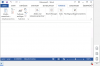
Eugene. K.
Parallels Team
Yes, indeed, the keyboard button is missing there.
We are going to fix it in the next update.
We are going to fix it in the next update.
Eugene. K.
Parallels Team
Hi, I'm glad to inform you that your issue is fixed in RAS v17.1. You can get it from parallels.com.
ParallelsU320
Junior Member
Thanks a lot