
First let me say how cool it is that the Parallels team read these threads for suggestions/requests...
and actually implement them! Outstanding stuff.
So... in an earlier thread thread I requested that Parallels absorb the functionality and raw cool of the 3rd party app, Virtue Desktops by Tony Arnold. This app allows the user to have more than one desktop, and to hot-key swap between them with a cube transition (among others). Many users had seen the beauty of combining this with Parallels, i.e. giving Parallels its own desktop, putting it in fullscreen mode there, and then being able to instance swap from Windows <---> Mac OSX.
Here's the screenie:
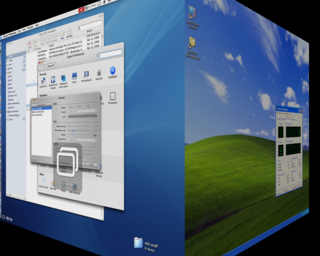
Now... in Beta 5 Parallels HAVE implemented a fancy cube type transition, with some help from Tony Arnold. The transition itself works well and is pretty! HOWEVER, unlike the Virtue Desktop solution, the Parallels feature isn't really a _useful_ thing - it's pure eye candy, and is the kind of that you would try a few times then switch off. Parallels have simply introduced some new code for the "go to full screen", so in order to rotate to XP full screen you must first be looking at a mac desktop with a big-assed XP window overflowing the screen. The result is of course a pretty-but-slow method of toggling from full screen to windowed mode. What the Virtue solution offered was very different - it wasn't a way to go full screen <--> windowed mode. It was a way to go Mac OS <--> Windows directly.
I guess this makes me wonder exactly what I was hoping they'd implement!
Really what was needed is to have a special working mode wherein switching to the Parallels app from any other app automatically makes the cube-rotate-to-fullscreen. Similarly, while using XP hitting some key-combo rotates you back and gives focus to the previous mac app. Or to Finder if we can't tell what previous app was.
and actually implement them! Outstanding stuff.
So... in an earlier thread thread I requested that Parallels absorb the functionality and raw cool of the 3rd party app, Virtue Desktops by Tony Arnold. This app allows the user to have more than one desktop, and to hot-key swap between them with a cube transition (among others). Many users had seen the beauty of combining this with Parallels, i.e. giving Parallels its own desktop, putting it in fullscreen mode there, and then being able to instance swap from Windows <---> Mac OSX.
Here's the screenie:
Now... in Beta 5 Parallels HAVE implemented a fancy cube type transition, with some help from Tony Arnold. The transition itself works well and is pretty! HOWEVER, unlike the Virtue Desktop solution, the Parallels feature isn't really a _useful_ thing - it's pure eye candy, and is the kind of that you would try a few times then switch off. Parallels have simply introduced some new code for the "go to full screen", so in order to rotate to XP full screen you must first be looking at a mac desktop with a big-assed XP window overflowing the screen. The result is of course a pretty-but-slow method of toggling from full screen to windowed mode. What the Virtue solution offered was very different - it wasn't a way to go full screen <--> windowed mode. It was a way to go Mac OS <--> Windows directly.
I guess this makes me wonder exactly what I was hoping they'd implement!
Really what was needed is to have a special working mode wherein switching to the Parallels app from any other app automatically makes the cube-rotate-to-fullscreen. Similarly, while using XP hitting some key-combo rotates you back and gives focus to the previous mac app. Or to Finder if we can't tell what previous app was.

