
Install the app
How to install the app on iOS
Follow along with the video below to see how to install our site as a web app on your home screen.
Note: This feature may not be available in some browsers.
You are using an out of date browser. It may not display this or other websites correctly.
You should upgrade or use an alternative browser.
You should upgrade or use an alternative browser.
Record Screen no sound "Zoom" meeting
- Thread starter Stephen10
- Start date

KirillBagrinovskiiy
Parallels Developers
Hello
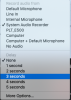
I see you've select "System Audio Recorder"
Can you choose "Computer + Default Microphone" menu item? After that you have to install Parallels Toolbox audio plugin and restart computer.
I see you've select "System Audio Recorder"
Can you choose "Computer + Default Microphone" menu item? After that you have to install Parallels Toolbox audio plugin and restart computer.

sergk
Parallels Developers
> Can you provide me a download link for the audio plugin?
It is a part of Parallels Toolbox product and is installing after first need. If you don't see installation/restart prompt then this audio plugin is already installed in your system. Try to start screen recording, then start some audio (from youtube, e.g.) and talk something into the microphone. Was recording successful? Does it contain audio both from computer and microphone?
It is a part of Parallels Toolbox product and is installing after first need. If you don't see installation/restart prompt then this audio plugin is already installed in your system. Try to start screen recording, then start some audio (from youtube, e.g.) and talk something into the microphone. Was recording successful? Does it contain audio both from computer and microphone?
I am having the same issue:
- Test recording on YouTube works fine. But,
- Issue is on Zoom web meeting: despite selecting various audio options (i.e. computer, computer+default mic), no audio presents itself on playback.
I am presuming this issue is still being investigated. Until this is resolved this functionality (record screen) is worth less than what it could potentially be during these working from home COVID times.
- Test recording on YouTube works fine. But,
- Issue is on Zoom web meeting: despite selecting various audio options (i.e. computer, computer+default mic), no audio presents itself on playback.
I am presuming this issue is still being investigated. Until this is resolved this functionality (record screen) is worth less than what it could potentially be during these working from home COVID times.

Maria@Parallels
Problem solver
Hi, are you using the latest Parallels Toolbox version?I Got the same issue.
video and audio recording works fine with Youtube.
video recording in zoom is ok, but no audio.
Please fix this, or at least shed a light on what the problem might be, as I see there are more users with the same issues
Due to the total lack of technical support, I will try to find the fix somewhere else.I am using 4.5.0.
I belive it´s the latest atm
Maria@Parallels
Problem solver
Hi, please sorry for the delay in response. Could you collect the tech report once the issue reproduced and reply us back with the report's ID number please?I am using 4.5.0.
I belive it´s the latest atm