Process for Converting from Legacy to UEFI (in prep for Win 11)

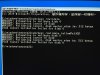
"ValidateLayout: First partition too close to the beginning of the disk. Should start at offset 17408 or above, found at 512
This is absolutely the case, but I have no idea what I can do about it. This VM was created under Parallels back in Windows 7 (perhaps even XP) and has simply been upgraded since then.

Furthermore, on a separate machine with Parallels and running an unrelated VM created fresh with Windows 10 (not upgraded), the first partition begins in exactly the same place. So now I am wondering why many more people are not seeing this error when trying to perform this process?
 
@Consonanza., @Mark Fine is correct: this thread isn't about adding TPM per se, but rather converting from Legacy to UEFI with existing VMs. You'll see a section at the bottom of that article under Troubleshooting called TPM chip is not on the list, and you'll see that the article says to just create a new VM (i.e. not use your existing VM with all your data in it!). That's the case where the procedure that @Mark Fine created solves a problem.
 
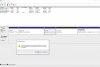
I am getting a failure to validate when running the mbr2gpt utility, presumably because I have 4 partitions ... see screen shot. When I go to delete one (This is a test VM) I get a message, as per screenshot that the partition is related to other systems on the disk. I am concerned I may wreck my Mac disk. Admit I don't understand what the Disk Mgmt utility is looking at. Are all these partitions within the VM or am I at risk here deleting partitions?
 

Attachments

  • Screen Shot 2022-09-15 at 2.57.41 pm.jpg
    Screen Shot 2022-09-15 at 2.57.41 pm.jpg
    347.3 KB · Views: 14
Simething strange here based on further investigation. Disk appears to be GPT but partitions are MBR. Abyone assist?
 
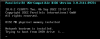
I've run through the procedure twice (got the RE error as described but all else was as expected). Both times, the VM does not boot and I get the below. I also added "vm.bios.efi=0" under advanced in Boot Options. I'l running Parallels 18. Any thoughts?


upload_2022-9-21_22-12-39.png
 
Simething strange here based on further investigation. Disk appears to be GPT but partitions are MBR. Abyone assist?
Hi I know it is rather late, where you able to convert to UEFI?
I have the same issue, mine VM is created from a Bootcamp partition.

Thank you.
 
Hi I know it is rather late, where you able to convert to UEFI?
I have the same issue, mine VM is created from a Bootcamp partition.

Thank you.
Unfortunately no, This VM remains on Win 10. I eventually migrated everthing to a fresh VM of Win 11.
 
Hi I know it is rather late, where you able to convert to UEFI?.
No. My first partition is too close to the head of the drive and no one can tell me how to move it back to a position where the Windows tool can upgrade it.
I consigned myself to never being able to upgrade my VM to Windows 11. Since I don't relish starting from zero to assemble yet another Windows system that has all the tools I need, I'll just run 10 until it falls apart.
Windows not having a file-migration facility is simply monstrously user-hostile.
 
No. My first partition is too close to the head of the drive and no one can tell me how to move it back to a position where the Windows tool can upgrade it.
I consigned myself to never being able to upgrade my VM to Windows 11. Since I don't relish starting from zero to assemble yet another Windows system that has all the tools I need, I'll just run 10 until it falls apart.
Windows not having a file-migration facility is simply monstrously user-hostile.

Hi, I managed to convert my virtual disk and then upgrade.
It requires to remove the not used partition, move the windows bootcamp portion and then delete the EFUI portion in a Linux Virtual Machine (VM). Then booting the windows VM with a recovery usb stick and create a new EFI partition with diskpart and use bcdboot to populate the new EFI partition. You can the upgrade to Windows 11.
Let me know if you are convertible in linux and moving virtual disks around in VMs.
I can dan provide a more or less detailed instruction.
 
So, apparently this is possible using the following procedure:
-SNIP-
Not real worried about the first thing because this processor isn't listed as being supported for the current version of Win10 (21H1) on Microsoft's site, either.

This worked like magic and was a quick process. I'm dealing with an ancient (2012) VM running Windows 10, but very poorly. Tech support recommended a new VM but I didn't want to reinstall and reconfigure every program and plug-in. I followed this process to see if the W11 upgrade would rejuvenate the performance of my VM. I'm at 80% install, so hopefully I have good new to report.
 
Sure wish this worked for me. Running Sonoma 14.11 and Parallels 18 standard on an iMac 2020 with the core i9. It's stuck attempting to repair. Multiple reboots never work. I edit the file fine (though it's slightly different than what was given) and then can add the TPM Chip just fine as well. But I can never get past repairing after rebooting many times. I think I need to do a fresh install, sadly.
 
I followed the instructions Mark provided but received the error message Disk layout validation failed for disk 0
Any advice/assistance would be appreciated
 

Attachments

  • IMG_0922.jpeg
    IMG_0922.jpeg
    559.5 KB · Views: 11
I'm running a 2019 Macbook Pro X86 with Parallels 26.2.0. Followed Mark Fine's recommendation to upgrade my old Windows 10 VM to Windows 11 and got W11 to run. Ran into one inconvenience. The Win 11 does not boot up when I start Parallels. I get a UEFI shell that spits out BLK info and then says it will start a shell script startup.nsh in 5 seconds. If I type "exit" at the next prompt, I'm brought to a screen "Parallels Virtual Platform". Using the arrow keys I can select the Boot Manager, which gives three options: EFI Internal Shell, Windows Boot Manager, or UEFI Virtual HDD[0]. If I choose either of the two latter choices, Win11 will boot up and runs as expected. It's usable.

Any advice about how to make Win 11 boot up as expected? Thanks!
 
Back
Top