Hi there,
I just purchased Parallels so I could specifically use Windows 10 on my new M1 iMac 2021, but the simple instructions of the brief OS installation video on the Parallels page are not working for me.
First, I signed up as a Microsoft Insider so I could get the ARM Windows 10 build. I then downloaded the file "Windows10_InsiderPreview_Client_ARM64_en-us_21354.VHDX" (9.75GB) and put it on my desktop. Everything seemed to be working fine up to this point.
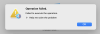
However, when I run the Parallels Installation Assistant, it cannot automatically find the VHDX file, even if it is sitting on my desktop (I tried putting it elsewhere, but it still cannot auto-find it). When I select it manually, it gives me the following warning "Unable to detect operating system". I go ahead and click "Continue" to proceed anyway and then it asks me a couple of questions as to what OS it is installing (Windows 10), what I will be using it for, and where to put it, and when I click on "Create" it gives me the error "Operation failed. Failed to execute the operation." Clicking on "Help me solve the problem" does not help me resolve the problem, it just takes me to a generic help page with no information on this.
This is as far as I can get with the installation and I have to restart the Installation Assistant at this point. I am not sure what I am doing wrong or what I need to do to install Windows 10. The instructions are very simple, and I was able to install Ubuntu fine as a test. But the installation of Windows 10 does not work.
Any advice would be appreciated! Thank you!
I just purchased Parallels so I could specifically use Windows 10 on my new M1 iMac 2021, but the simple instructions of the brief OS installation video on the Parallels page are not working for me.
First, I signed up as a Microsoft Insider so I could get the ARM Windows 10 build. I then downloaded the file "Windows10_InsiderPreview_Client_ARM64_en-us_21354.VHDX" (9.75GB) and put it on my desktop. Everything seemed to be working fine up to this point.
However, when I run the Parallels Installation Assistant, it cannot automatically find the VHDX file, even if it is sitting on my desktop (I tried putting it elsewhere, but it still cannot auto-find it). When I select it manually, it gives me the following warning "Unable to detect operating system". I go ahead and click "Continue" to proceed anyway and then it asks me a couple of questions as to what OS it is installing (Windows 10), what I will be using it for, and where to put it, and when I click on "Create" it gives me the error "Operation failed. Failed to execute the operation." Clicking on "Help me solve the problem" does not help me resolve the problem, it just takes me to a generic help page with no information on this.
This is as far as I can get with the installation and I have to restart the Installation Assistant at this point. I am not sure what I am doing wrong or what I need to do to install Windows 10. The instructions are very simple, and I was able to install Ubuntu fine as a test. But the installation of Windows 10 does not work.
Any advice would be appreciated! Thank you!