Host: Mac OS X 10.5.5
PD 4.0.3540
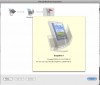
I'd like to request that the Snapshot Manager functionality be fixed to show the "Description" when you highlight a snapshot in snapshot manager. In PD 3, we could click on a snapshot and see it's description right on the Snapshot Dialog box. Now we have to click on a snapshot, then click "Edit..." to see them.
Is there a way to turn this functionality back on? It was MUCH more convenient the other way.
TIA, Steve
PD 4.0.3540
I'd like to request that the Snapshot Manager functionality be fixed to show the "Description" when you highlight a snapshot in snapshot manager. In PD 3, we could click on a snapshot and see it's description right on the Snapshot Dialog box. Now we have to click on a snapshot, then click "Edit..." to see them.
Is there a way to turn this functionality back on? It was MUCH more convenient the other way.
TIA, Steve