
Install the app
How to install the app on iOS
Follow along with the video below to see how to install our site as a web app on your home screen.
Note: This feature may not be available in some browsers.
You are using an out of date browser. It may not display this or other websites correctly.
You should upgrade or use an alternative browser.
You should upgrade or use an alternative browser.
PD13 on High Sierra can't see another Hard driver
- Thread starter AndyL5
- Start date
Similar like my issue: https://forum.parallels.com/threads/bootcamp-partition-not-found-in-manual-configuration.342202/
I think Parallel 13 is not working well on High Sierra as many user report the same problem in the forum too.
I think Parallel 13 is not working well on High Sierra as many user report the same problem in the forum too.
Alfena@Parallels
Pro
I have the same issue, macOS High Sierra 10.13 (17A365)
Hello @JosepM3, please follow as suggested below:
Disable System Integrity Protection (SIP).
Disable System Integrity Protection (SIP).
- Restart the Mac, on Apple logo loading screen press CMD + R to boot into Recovery.
- In Recovery, on Mac menu bar locate Utilities menu > open Terminal application.
- Type in the commands below one-by-one:
csrutil disable
reboot
- Back in a normal mode remove the existing machine or create the new one, depending on the customer's scenario.
- Boot macOS into Recovery again and enable SIP back running the following Terminal commands:
csrutil enable
reboot. Please see if this works. Thanks!
It works!!! Thank you very much!!!Hello @JosepM3, please follow as suggested below:
Disable System Integrity Protection (SIP).
- Restart the Mac, on Apple logo loading screen press CMD + R to boot into Recovery.
- In Recovery, on Mac menu bar locate Utilities menu > open Terminal application.
- Type in the commands below one-by-one:
csrutil disable
reboot
- Back in a normal mode remove the existing machine or create the new one, depending on the customer's scenario.
- Boot macOS into Recovery again and enable SIP back running the following Terminal commands:
csrutil enable
reboot. Please see if this works. Thanks!
Alfena@Parallels
Pro
W
Works for me... thanks!!!Hello @JosepM3, please follow as suggested below:
Disable System Integrity Protection (SIP).
- Restart the Mac, on Apple logo loading screen press CMD + R to boot into Recovery.
- In Recovery, on Mac menu bar locate Utilities menu > open Terminal application.
- Type in the commands below one-by-one:
csrutil disable
reboot
- Back in a normal mode remove the existing machine or create the new one, depending on the customer's scenario.
- Boot macOS into Recovery again and enable SIP back running the following Terminal commands:
csrutil enable
reboot. Please see if this works. Thanks!
Alfena@Parallels
Pro

Alfena@Parallels
Pro
Hello @AndyL5, Please update Parallels Desktop 13 to the latest build http://kb.parallels.com/111603 and check if it works. Thanks
Hi @Alfena@Parallels,
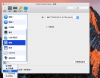
I had update PD13(13.1.0 (43108)) yesterday, but it still not work.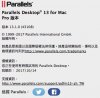
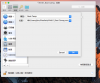
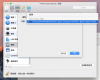
When add a hard driver on the configure of PD13, it only have "add a new visual hdd", "add a existing visual hdd" and "boot camp"(Sorry, My PD13 is Chinese version).
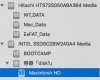
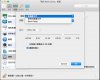
It can't let me to add my another hdd of my MBP, but it can on the PD11.
I had update PD13(13.1.0 (43108)) yesterday, but it still not work.
When add a hard driver on the configure of PD13, it only have "add a new visual hdd", "add a existing visual hdd" and "boot camp"(Sorry, My PD13 is Chinese version).
It can't let me to add my another hdd of my MBP, but it can on the PD11.
JohnChengJ
Bit poster
I encounter the same problem, I lost connection of 2nd hard disk ,and still can not connect it even upgrade to PD13
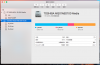
When I adding a "Boot Camp" driver,I still only cannot get the physical hard driver on the option list to select
(I disabled the csrutil,,but still not work)
It was correct last week, what happened !?
it's very urgent problem
(My Mac book pro OS version is 10.12.6)
When I adding a "Boot Camp" driver,I still only cannot get the physical hard driver on the option list to select
(I disabled the csrutil,,but still not work)
It was correct last week, what happened !?
it's very urgent problem
(My Mac book pro OS version is 10.12.6)
Attachments
Last edited:

Hi @AndyL5, we released a new update Parallels Desktop 13 for Mac Update 1 Hotfix 1 (13.1.1-43120). To check for updates, click on the Parallels Desktop menu on Mac menu bar and select Check for Updates: http://kb.parallels.com/124262Hi @Alfena@Parallels,
I had update PD13(13.1.0 (43108)) yesterday, but it still not work. View attachment 13031
When add a hard driver on the configure of PD13, it only have "add a new visual hdd", "add a existing visual hdd" and "boot camp"(Sorry, My PD13 is Chinese version).
View attachment 13032 View attachment 13033
It can't let me to add my another hdd of my MBP, but it can on the PD11.
Hi @JohnChengJ, we released a new update Parallels Desktop 13 for Mac Update 1 Hotfix 1 (13.1.1-43120) and this update addresses this issue. To check for updates, click on the Parallels Desktop menu on Mac menu bar and select Check for Updates: http://kb.parallels.com/124262I encounter the same problem, I lost connection of 2nd hard disk ,and still can not connect it even upgrade to PD13
When I adding a "Boot Camp" driver,I still only cannot get the physical hard driver on the option list to select
(I disabled the csrutil,,but still not work)
It was correct last week, what happened !?
it's very urgent problem
(My Mac book pro OS version is 10.12.6)
JohnChengJ
Bit poster
Dear Paul:Hi @JohnChengJ, we released a new update Parallels Desktop 13 for Mac Update 1 Hotfix 1 (13.1.1-43120) and this update addresses this issue. To check for updates, click on the Parallels Desktop menu on Mac menu bar and select Check for Updates: http://kb.parallels.com/124262
I am sure my PD is up to date, but still not work