Install the app
How to install the app on iOS
Follow along with the video below to see how to install our site as a web app on your home screen.
Note: This feature may not be available in some browsers.
You are using an out of date browser. It may not display this or other websites correctly.
You should upgrade or use an alternative browser.
You should upgrade or use an alternative browser.
Pasting images from clipboard to win7 client results in black image
- Thread starter trebormik
- Start date
William Fulmer
Junior Member
Same exact issue here.
Mavericks 10.9 and Parallels 9.0.23140.
Big black square
Attached image shows something I am pasting into Outlook 2010.

Mavericks 10.9 and Parallels 9.0.23140.
Big black square
Attached image shows something I am pasting into Outlook 2010.

In this case doesn't determined the change clipboard. You need just activate any host application (Finder, for example) and then VM again.
Didn't help. Image comes back as a black rectangle (of the right size) to Win7. Tried pasting into different apps - the same. Black rectangle. Worked in Parallels 8.
I have the same issue. If I copy any image from the Mac then paste it into any documents, emails on the PC, even into Skype which previously worked, I get a black square. I've had no previous problem with this method until a week ago. I can't recall any updates to my system that may have caused this to change. Parallels 9.0.23350, Windows 7 Pro SP1, OSX 10.9
I spoke to tech support last night on Skype. very helpful and knowledgeable.
this is a known problem which has been reported 6 times. I was offered a workaround - save to a file to mac and attach the file to my email.
I replied this would not suit my purpose and I needed a fix. The problem was then escalated to development with a ticket number of 32044194
i suggest anyone with this problem click on 'help,report a problem' in parallels and add yourself to this ticket. i.e. just say you have the same problem pasting an image from mac into windows. This will help raise the urgency I assume.
this is a known problem which has been reported 6 times. I was offered a workaround - save to a file to mac and attach the file to my email.
I replied this would not suit my purpose and I needed a fix. The problem was then escalated to development with a ticket number of 32044194
i suggest anyone with this problem click on 'help,report a problem' in parallels and add yourself to this ticket. i.e. just say you have the same problem pasting an image from mac into windows. This will help raise the urgency I assume.
comenacatapulta
Bit poster
Same problem for me 
no yet solution?
no yet solution?
I have the same issue pasting images into the VM
parallels 9.0.23350 windows XP SP3
worked fine for years until upgrade to parallels 9 / Maverick.
Clipboard images are garbled
I get a similar issue.
Clipboard images are severely garbled when pasting to Office with the new Parallels on Maverics.
I have to save to disk then load again in Office to get it to work. Annoying.
Bjørn
the latest update (rev 951362 - 3rd dec 2013) fixed it for me, but it is still a bit flakey in that sometimes I have to copy things 3 or 4 times before they will paste into XP.
I get a similar issue.
Clipboard images are severely garbled when pasting to Office with the new Parallels on Maverics.
I have to save to disk then load again in Office to get it to work. Annoying.
Bjørn
the latest update (rev 951362 - 3rd dec 2013) fixed it for me, but it is still a bit flakey in that sometimes I have to copy things 3 or 4 times before they will paste into XP.
XP? are you serious? You expect anything to work in XP? I like to be fair but at this point you need to upgrade to a decent version of Windows (like 7).
Now seriously, I had my problem resolved with the latest Parallels 8 update. I only saw it once recently where the pasted screen capture was all black. I restarted my Windows vm and it worked again. So it is sometimes buggy.
I get a similar issue.
Clipboard images are severely garbled when pasting to Office with the new Parallels on Maverics.
I have to save to disk then load again in Office to get it to work. Annoying.
Bjørn
when you say "Garbled" it is very unclear what is going on. Could you be a bit more specific?
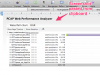
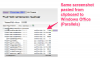
Yes, just upgraded from previous version and reinstalled Parallells Tools.
However, I'm on a new Mac. Used Apples Migration Assistant to move everything from my previous laptop.
Seemed a little shaky with Parallels, and I had to manually go in and copy my Windows image once more to make it work properly.
Maybe a reinstall or repair is called for? How should I proceed?
Bjørn
However, I'm on a new Mac. Used Apples Migration Assistant to move everything from my previous laptop.
Seemed a little shaky with Parallels, and I had to manually go in and copy my Windows image once more to make it work properly.
Maybe a reinstall or repair is called for? How should I proceed?
Bjørn
I have the same issue. I've submitted a help ticket. My details (for those who are interested)
Parallels Desktop version 9.0.24172.951362
Host: Apple Mac OS X 10.9.1 (13B42) "Mavericks" running on 15-inch Mid 2012 MacBook Pro. (2.6 GHz Intel Core i7, 16 GB RAM)
Guest: Microsoft Windows 7 Enterprise, 64-bit.
To reproduce:
1) With Finder active, press Command+Shift+4. Click and drag area of the screen.
2) Activate Outlook email window, press Command+v.
In some cases, usually after a long sleep or a long period of inactivity, the steps above will paste a black square equal to the size of the image on the Mac clipboard.
Suspending the Guest, closing Parallels and then launching the Guest again will correct the error. Restarting the Guest is not necessary.
-Brian
Parallels Desktop version 9.0.24172.951362
Host: Apple Mac OS X 10.9.1 (13B42) "Mavericks" running on 15-inch Mid 2012 MacBook Pro. (2.6 GHz Intel Core i7, 16 GB RAM)
Guest: Microsoft Windows 7 Enterprise, 64-bit.
To reproduce:
1) With Finder active, press Command+Shift+4. Click and drag area of the screen.
2) Activate Outlook email window, press Command+v.
In some cases, usually after a long sleep or a long period of inactivity, the steps above will paste a black square equal to the size of the image on the Mac clipboard.
Suspending the Guest, closing Parallels and then launching the Guest again will correct the error. Restarting the Guest is not necessary.
-Brian