Paralles Windows Client cannot connect out of HTML5 Portal

JuergenS11

Bit poster
Hi All,
I have published HTML5 Portal to the internet via Sophos WAF. HTML5 connection within a browser is working fine. When I try to start the windows client out of HTML5 portal I get a connection error.

Is there something special I have to take care of?

Regards, Juergen
 
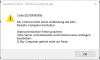
When you launch the Windows client from the HTML5 portal do you get the Windows client actually started? The connection error happening in your case appears in the windows client, right? Please show us the error.
HTML5 client gives Windows Client instructions on where to connect to (basically RAS connection settings) then RAS Connection is established and RDP connection to RAS Gateway is started.
As you can see there are several communications involved in getting your app on your desktop. but normally all these communications are executed via port 443 on RAS Gateway. I doubt 443 is prohibited on your firewall unless it decrypts traffic in the middle and RAS gets HTTP traffic on 443 while waiting for HTTPS.
 
Dear Eugene,
thanks for your answer. Please xcute the extremly delayed answer. But as of corona the customer hat different priorities. However I need to follow up as we have to extend parallels ressources in order to provide more power, flexibility and convinience for home office work.

The windows client is comming up. After delay of approx. 1min it shows error "Code [02/00000006]. I can't see errors in Firewall log.

Please be aware that HTML5 client is working properly.

Some words to our configuration. Parallels RAS gateway is published through a Sophos UTM Firewall with WAF functionality (no port forwarding).

What is best practice how to poblish RAS Gateway?
- placing the server direct in the internet
- RAS gateway in a DMZ behind a firewall with port forwarding HTTPS 443
- WAF publishing?

Is it possible to buy some support hours in order to fix the problem and discuss some concerns?

Kind Regards, Juergen
 

Attachments

  • Parallels-Error.PNG
    Parallels-Error.PNG
    7.8 KB · Views: 7
Good Morning, We are experiencing the same problem with an Azure WAF, please could you let us know if this was resolved and what the fix was? I will submit a ticket also.
 
I tried with to build a secure mfa solution via Microsoft Application Proxy, but I run into problems, too.
Its seems Parallels RAS Websocket is the problem in my case.
Does anybody found a reliable, performing and secure Enterprise Web Access solution, who ist working for both, the html5 an windows ras client ?? This seems to be a challenge..
 
We have started using a normal Azure Firewall rather than a dedicated WAF and on initial testing seems to working ok, only need 80 and 443 open.
 
Hi GertG,
that's true, Microsoft Application Proxy doesn't support websockets in general (https://docs.microsoft.com/en-us/az...qliksense-and-remote-desktop-web-client-html5) we are trying to find a solution for this issue, but there is no such yet. As MooD Online mentioned the recommended way is to block all traffic apart from 443 (80 is optional, mostly for HTTP to https redirection purposes) and use any traffic loab balancer that suits you. For example Azure LB works totally fine with our gateways and both HTML5 and native clients.
 
Meanwhile (all the years) we tried and tried to find a solution, to connect the external RAS windows client, via WAF and Parallels HALBs, to our RAS Portal. We had a lot of specialists, also from Parallels on board, but we were never able to find a solution for this (i think standard) usecase, just to deliver Remote-Apps.

We tried a lot with Citrix Netscaler and Kemp Loadmaster, but there was never a way, to access RAS via any WAF, coming with the RAs-Client from the Internet and doing a MFA with a standard cloud authentication Provider (like Entra ID).

@Ras Support: It seems there is still no secure Solution, for this conventional enterprise usecase.
We are now checking Microsoft Azure Virtual Desktop and if it works (it seems), Parallels has to say "good bye" to 600 Licenses.
 
Hi GertG,
that's true, Microsoft Application Proxy doesn't support websockets in general (https://docs.microsoft.com/en-us/az...qliksense-and-remote-desktop-web-client-html5) we are trying to find a solution for this issue, but there is no such yet. As MooD Online mentioned the recommended way is to block all traffic apart from 443 (80 is optional, mostly for HTTP to https redirection purposes) and use any traffic loab balancer that suits you. For example Azure LB works totally fine with our gateways and both HTML5 and native clients.


I notice websockets are now supported:
Microsoft Entra application proxy frequently asked questions - Microsoft Entra ID | Microsoft Learn
 
Back
Top