
Hi Group!
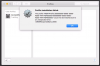
This is our first time trying to create a High Sierra (10.13.6) test environment using Parallels 13 with our JAMF Pro Casper instance but every-time we try to add the VM to our Casper environment, we're getting the following error when approving our MDMs:
We read that we need to edit the "boot flags" in:
Actions Menu > Configure > Hardware > Boot Order > Advanced Settings
And that we're supposed to add the serial number with this string:
devices.smbios.serial=(not the same but using a serial number similar to the host machine with one character off maybe)
and the device identifier using this string:
devices.mac_hw_model=(not really sure what to put here)
but when we enter all this we get the attached error. Anyone else successful in getting this to work?
Thanks a bunch!
This is our first time trying to create a High Sierra (10.13.6) test environment using Parallels 13 with our JAMF Pro Casper instance but every-time we try to add the VM to our Casper environment, we're getting the following error when approving our MDMs:
We read that we need to edit the "boot flags" in:
Actions Menu > Configure > Hardware > Boot Order > Advanced Settings
And that we're supposed to add the serial number with this string:
devices.smbios.serial=(not the same but using a serial number similar to the host machine with one character off maybe)
and the device identifier using this string:
devices.mac_hw_model=(not really sure what to put here)
but when we enter all this we get the attached error. Anyone else successful in getting this to work?
Thanks a bunch!
Last edited: