
Install the app
How to install the app on iOS
Follow along with the video below to see how to install our site as a web app on your home screen.
Note: This feature may not be available in some browsers.
You are using an out of date browser. It may not display this or other websites correctly.
You should upgrade or use an alternative browser.
You should upgrade or use an alternative browser.
Parallels Toolbox Stopped Working
- Thread starter DanS25
- Start date

sergk
Parallels Developers
Hello,Hi parallels toolbox has stopped opening for me too
did Parallels Toolbox itself stopped opening or some concrete tool is not opening?
Hello,
Break Time crashes and blocks the MacOS
Lately a problem occurred:
I would test the app »Break Time.app« and should as the first thing - in the MacOS settings - accept that my activities could be watched by the Toolbox.
However I could not change anything in the Settings, and I stopped with »Cancel«.
And then... The whole MacOS gets stuck
At every start and login as „Myself" since, I meet the same request to allow surveillance. Everytime; and I cannot avoid it. I press »Cancel«.
I only see:
- Break Time - File ... ... usual icons + Date + Time (on top)
The mouse pointer has become a spinning, multicoloured wheel.
The desktop background is the usual photo, but there are no icons there.
The only way to get out of that paralysis is pressing the on/off button on the rear.
Any ideas how to solve this?
Break Time crashes and blocks the MacOS
Lately a problem occurred:
I would test the app »Break Time.app« and should as the first thing - in the MacOS settings - accept that my activities could be watched by the Toolbox.
However I could not change anything in the Settings, and I stopped with »Cancel«.
And then... The whole MacOS gets stuck
At every start and login as „Myself" since, I meet the same request to allow surveillance. Everytime; and I cannot avoid it. I press »Cancel«.
I only see:
- Break Time - File ... ... usual icons + Date + Time (on top)
The mouse pointer has become a spinning, multicoloured wheel.
The desktop background is the usual photo, but there are no icons there.
The only way to get out of that paralysis is pressing the on/off button on the rear.
Any ideas how to solve this?

SilvanC
Member
Hello,
Break Time crashes and blocks the MacOS
Lately a problem occurred:
I would test the app »Break Time.app« and should as the first thing - in the MacOS settings - accept that my activities could be watched by the Toolbox.
However I could not change anything in the Settings, and I stopped with »Cancel«.
And then... The whole MacOS gets stuck
At every start and login as „Myself" since, I meet the same request to allow surveillance. Everytime; and I cannot avoid it. I press »Cancel«.
I only see:
- Break Time - File ... ... usual icons + Date + Time (on top)
The mouse pointer has become a spinning, multicoloured wheel.
The desktop background is the usual photo, but there are no icons there.
The only way to get out of that paralysis is pressing the on/off button on the rear.
Any ideas how to solve this?
Hi,
Check that the 'Open when Mac starts' option is disabled in the Break Time tool, by opening the tool and clicking the cogwheel at the top right corner. This should make the tool not re-start and ask for permission on each login.
Also, could you please send a Technical Report from Toolbox (Open Toolbox; click cogwheel at top-right; Help > Send Technical Data...) then post the report ID here. Thanks!
Thanks for a quick answer!
ID 370536544
The report has been sent.
With this user ("Admin") active it was possible to disable the option 'Open when Mac starts'. When I used the daily user account it wasn't. The settings seemed to be locked.
Must all of the Toolbox Package be uninstalled - and then reinstalled when I want to make the daily user account accessible again??
If so: How do I do that in the best way?
Technical environment:
iMac - 27" - RAM: 32 Gb - MacOS 11.3.1 (Big Sur)
ID 370536544
The report has been sent.
With this user ("Admin") active it was possible to disable the option 'Open when Mac starts'. When I used the daily user account it wasn't. The settings seemed to be locked.
Must all of the Toolbox Package be uninstalled - and then reinstalled when I want to make the daily user account accessible again??
If so: How do I do that in the best way?
Technical environment:
iMac - 27" - RAM: 32 Gb - MacOS 11.3.1 (Big Sur)
SilvanC
Member
Thanks for the report. Could you please try the following as a workaround:
Log in with the daily user account. Do not press 'Cancel' in the permission dialog so that macOS won't freeze. Open Terminal and paste the following command and press Enter:
defaults delete com.parallels.toolbox LaunchAtLoginTools
Then logoff, and when you next login, Break Time should not auto-start again.
Hope this helps! In the meantime we will continue investigating why the tool is freezing.
Log in with the daily user account. Do not press 'Cancel' in the permission dialog so that macOS won't freeze. Open Terminal and paste the following command and press Enter:
defaults delete com.parallels.toolbox LaunchAtLoginTools
Then logoff, and when you next login, Break Time should not auto-start again.
Hope this helps! In the meantime we will continue investigating why the tool is freezing.
Hello again,
I tried to follow the instruction (#8), it went like this:
At 1. attempt : Break Time showed up shortly, then disappeared. Thereafter desktop was completely empty. Everything seemed frozen.
Only way out: Panic stop (on/off button).
At 2. attempt I succeeded to launch the Terminal.
Terminal showed:
»The default interactive shell is now zdh.
To update your account to use zsh, please run 'chsh -s /bin/zsh'.
For more details, please visit https://support.apple.com/kb/HT208050. «
Must I do that first - before I enter the terminal command received in #8?
I tried to follow the instruction (#8), it went like this:
At 1. attempt : Break Time showed up shortly, then disappeared. Thereafter desktop was completely empty. Everything seemed frozen.
Only way out: Panic stop (on/off button).
At 2. attempt I succeeded to launch the Terminal.
Terminal showed:
»The default interactive shell is now zdh.
To update your account to use zsh, please run 'chsh -s /bin/zsh'.
For more details, please visit https://support.apple.com/kb/HT208050. «
Must I do that first - before I enter the terminal command received in #8?
Hi,
You can do it, but there is no need to; you can simply ignore this message and run the command.
As advised I entered the command:
„defaults delete com.parallels.toolbox LaunchAtLoginTools"
Reaction from Terminal:
Defaults[5517:194656]
Domain (com.paralles.toolbox) not found.
Defaults have not been changed.
I'm still stopped with Break Time in the background and the dialog box from Parallels Toolbox about permittance to PT to surveille.
SilvanC
Member
As advised I entered the command:
„defaults delete com.parallels.toolbox LaunchAtLoginTools"
Reaction from Terminal:
Defaults[5517:194656]
Domain (com.paralles.toolbox) not found.
Defaults have not been changed.
I'm still stopped with Break Time in the background and the dialog box from Parallels Toolbox about permittance to PT to surveille.
Seems you misspelled the command, and entered 'com.paralles.toolbox' instead of 'com.parallels.toolbox'
Seems you misspelled the command, and entered 'com.paralles.toolbox' instead of 'com.parallels.toolbox'
I cannot copy from one user to another.
In the Terminal window it was spelled correctly.
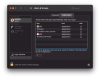
Alternatively you can try this: on the user acount, go to System Preferences > Users & Groups > Login Items as shown here:
View attachment 17839
If there is 'Parallels Toolbox' or 'Toolbox Tool Launcher' in the list, remove them by using the '-' button below the list.
Having chosen Users & Groups it took several minutes until that settings window occurred.
Again it took a long time until the Login items was active.
A few seconds earlier the PT dialog window (»Break Time requires...«) showed up. I have not touched it.
»Toolbox Tool Launcher« is shown (among the Login items).
When I try to choose it, nothing happens, and the "-" at the bottom remains grey and inactive.
The padlock down left is faded and cannot be unlocked.
I cannot launch any other app.
I tried to return to the top level of the System Preferences; 1 or 2 min to wait.
Back to Login items again; 1 or 2 min more.
Tried this 'exercise' 2 or 3 times.
Surprise: Now the Toolbox Tool Launcher has disappeared from the Login items.
Restart of system.
No Break Time.
I still cannot launch anything from the dock - nor from the Launch Pad.
Closed the System Preferences;
after several minutes the close down has still not been completed, the spinning wheel keeps running.
After (hard) restart only the empty desktop photo is shown.
After several minutes the icons in the top menu appear, but nothing there works.
The dock can be made visible; if I try to launch an app represented in the dock, the icon bumps a few times, and nothing else happens.
What is all this about? What can block the system - for one user, not for others?