
Install the app
How to install the app on iOS
Follow along with the video below to see how to install our site as a web app on your home screen.
Note: This feature may not be available in some browsers.
You are using an out of date browser. It may not display this or other websites correctly.
You should upgrade or use an alternative browser.
You should upgrade or use an alternative browser.
Parallels Service & 10.8 (Mountain Lion)
- Thread starter Daleski75
- Start date


Doing a little more digging it appears that the parallels kext that crashes (prl.hypervisor.kext) 10.8 is looking for something in two apple kexts (IOACPIFamily.kext and IOPCIFamily.kext) that have changed. In order to pull those kexts back from Lion I had to move a framework that also changed (IOKit.framework.) After doing this a whole new set of problems arise with broken AirPort drivers and loads of other stuff.
Edit: Ok just did some more testing and it has to do with the 64-bit side of the prl.hypervisor.kext. reboot holding 3 and 2 down to boot into 32-bit mode and run my parallels launcher that we had to use for parallels 6 and lion previews.
Network module is not working but virtual machines boot and are useable other than that.
UPDATE: Networking is now working. Check the same link below.
Parallels Desktop 7 on Mountain Lion (10.8)
Edit: Ok just did some more testing and it has to do with the 64-bit side of the prl.hypervisor.kext. reboot holding 3 and 2 down to boot into 32-bit mode and run my parallels launcher that we had to use for parallels 6 and lion previews.
Network module is not working but virtual machines boot and are useable other than that.
UPDATE: Networking is now working. Check the same link below.
Parallels Desktop 7 on Mountain Lion (10.8)
Last edited:
bearintraining
Bit poster
Agreed. Please fix!
Parallels 6 doesn't even load on my MacBookPro 6,2.
Parallels 6 doesn't even load on my MacBookPro 6,2.
Michael Pitt
Member
Edit: Ok just did some more testing and it has to do with the 64-bit side of the prl.hypervisor.kext. reboot holding 3 and 2 down to boot into 32-bit mode and run my parallels launcher that we had to use for parallels 6 and lion previews.
Did this work for you? I thought Mountain Lion was 64-bit kernel only? When I try this it just boots into a 64-bit kernel anyway.
Michael Pitt
Member
I thought I could boot into 32 bit mode, appears not.
I have a MBA 2011 Core i7, which came with Lion. I guess it's 64 bit all the way.
S.
Actually you can still get to a 32-bit kernel. I couldn't get it to work using the 3 and 2 keys held down, but if you put the arch=i386 flag into boot.plist it will boot to a 32-bit kernel. I assume this will be disabled in future builds as the developer documentation states its 64-bit kernel only.
Makes no difference sadly to Parallels working

Parallels Desktop for Mac 7 on Mountain Lion Dev Preview 1
I'm giving up on Parallels for now, it wasn't realistic to have any expectations about virtualizing on Mountain Lion. It just came out, what, 2 days ago?
Having said that, I am pleased with my Mountain Lion experience so far. None of my other software broke under this Dev Preview 1, except for Parallels ironically. Even Dropbox is working fine, although its integration within Finder is less obvious, since the little dynamic icons no longer appear (but it syncs just fine!).
I don't develop much, but I test a lot, and I would love to have a Parallels Desktop fix to virtualize my Windows guest OS. I think that one of the gentlemen who posted above found about 2 or 3 extensions or parameters that may impact on Parallels working or not. Seems simple enough to fix. Mountain Lion isn't even all that different from Lion, it's certainly not a 'major' upgrade like Leopard was to Tiger, and to a certain extent, Lion was to Snow Leopard.
Please work your magic at your convenience, Parallels dev.
Go Parallels team ;-)
I'm giving up on Parallels for now, it wasn't realistic to have any expectations about virtualizing on Mountain Lion. It just came out, what, 2 days ago?
Having said that, I am pleased with my Mountain Lion experience so far. None of my other software broke under this Dev Preview 1, except for Parallels ironically. Even Dropbox is working fine, although its integration within Finder is less obvious, since the little dynamic icons no longer appear (but it syncs just fine!).
I don't develop much, but I test a lot, and I would love to have a Parallels Desktop fix to virtualize my Windows guest OS. I think that one of the gentlemen who posted above found about 2 or 3 extensions or parameters that may impact on Parallels working or not. Seems simple enough to fix. Mountain Lion isn't even all that different from Lion, it's certainly not a 'major' upgrade like Leopard was to Tiger, and to a certain extent, Lion was to Snow Leopard.
Please work your magic at your convenience, Parallels dev.
Go Parallels team ;-)
Michael Pitt
Member
I've managed to get my VMs booting now in Parallels, but as an earlier post said the USB and networking doesn't work. Basically you need to boot into a 32-bit kernel by adding arch=i386 into your boot.plist and then use the old workaround for when Lion first came out.:-
sudo kextutil "/Library/Parallels/Parallels Service.app/Contents/Kexts/10.6/prl_hypervisor.kext"
sudo kextutil "/Library/Parallels/Parallels Service.app/Contents/Kexts/10.6/prl_hid_hook.kext"
sudo kextutil "/Library/Parallels/Parallels Service.app/Contents/Kexts/10.6/prl_usb_connect.kext"
sudo kextutil "/Library/Parallels/Parallels Service.app/Contents/Kexts/10.6/prl_netbridge.kext"
sudo kextutil "/Library/Parallels/Parallels Service.app/Contents/Kexts/10.6/prl_vnic.kext"
sudo kextutil "/Library/Parallels/Parallels Service.app/Contents/Kexts/10.6/prl_hypervisor.kext"
sudo kextutil "/Library/Parallels/Parallels Service.app/Contents/Kexts/10.6/prl_hid_hook.kext"
sudo kextutil "/Library/Parallels/Parallels Service.app/Contents/Kexts/10.6/prl_usb_connect.kext"
sudo kextutil "/Library/Parallels/Parallels Service.app/Contents/Kexts/10.6/prl_netbridge.kext"
sudo kextutil "/Library/Parallels/Parallels Service.app/Contents/Kexts/10.6/prl_vnic.kext"
Thank you for the precious tips ! You made me able to boot Parallels 7 under Mountain Lion, this worked for me:
1) I used this command in the terminal to start in 32 bits
sudo systemsetup -setkernelbootarchitecture i386
( to default start in 64 bits again...
sudo systemsetup -setkernelbootarchitecture x86_64 )
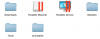
2) The file "Parallels Service" has again to be put into the folder /library/parallels
(Image 1)
this because Mountain Lion places it into a new root folder "Incompatible Software" when booting in 64 bits
3) I'm now booting Parallels 7 with the Program "FileServe Parallels Desktop Launcher.zip" mentioned here by 87racer
http://bs87.com/post/17757954386/parallels-desktop-7-on-mountain-lion-10-8
I'm also hoping for a quick fix by the Parallels team, thanks in advance
Have a nice w-e everyone
1) I used this command in the terminal to start in 32 bits
sudo systemsetup -setkernelbootarchitecture i386
( to default start in 64 bits again...
sudo systemsetup -setkernelbootarchitecture x86_64 )
2) The file "Parallels Service" has again to be put into the folder /library/parallels
(Image 1)
this because Mountain Lion places it into a new root folder "Incompatible Software" when booting in 64 bits
3) I'm now booting Parallels 7 with the Program "FileServe Parallels Desktop Launcher.zip" mentioned here by 87racer
http://bs87.com/post/17757954386/parallels-desktop-7-on-mountain-lion-10-8
I'm also hoping for a quick fix by the Parallels team, thanks in advance
Have a nice w-e everyone
Attachments
Thanks PascalRod for the tips, but when I tried to run Windows 7 x64 in the Boot Camp partition Parallels Tools refused to install and upon restarting the virtual machine I got a BSOD.
Without network or USB functionality this solution is also incomplete. I'm sure the Parallels engineers are working on a solution and will post it soon!
Without network or USB functionality this solution is also incomplete. I'm sure the Parallels engineers are working on a solution and will post it soon!