parallels full screen display breaks up after swipe from mac screen

AxelH3

Bit poster
Since installation of Mac OS high sierra swiping in the Parallels Windows 10 full screen guest from a mac screen sometimes results in a garbled screen.
See video http://ahab.de/IMG_6057.m4v
Clicking on the garbled screen sometimes results in the correct display to appear.
Did never happen with sierra.
MacBook Pro 15, Mid 2012
NVIDIA GeForce GT 650M 512 MB
External Monitor Dell UP2516D
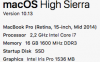
 
Same issue, MacBook Pro (13-inch, 2017), no external monitor.
Didn't notice it with the High Sierra GM either; possibly it's a new problem with the release version.
 
Same issue. I'm running Parallels 13 with a Windows 10 VM and upgraded mac OS to High Sierra today. Swiping between Mac and Windows desktops when in full screen mode produces a scrambled Windows desktop or overlays some or all of the Mac desktop on Windows. Clicking on the garbled screen sometimes clears it, otherwise repeated swiping or switching to Coherence and then back to Full Screen. I reinstalled Parallel Tools, but that made no difference.

EDIT: MacBook Pro 15" Retina Late 2012 - no external monitor
 
Last edited:
Same deal here. Parallels 13 w/ Win10 VM after upgrading to High Sierra. Happens to be on an external monitor on my 15-inch mid-2015 MBP.
The most reliable way of getting it to behave again for me seems to be swiping up into mission control, then selecting the space again, then clicking into it.
 
Same exact issue here. Upgraded to High Sierra and had the issue with Parallels 10. Figured that meant it was time to upgrade, but same problem persists on 13.
 
Same deal here. Parallels 13 w/ Win10 VM after upgrading to High Sierra. Happens to be on an external monitor on my 15-inch mid-2015 MBP.
The most reliable way of getting it to behave again for me seems to be swiping up into mission control, then selecting the space again, then clicking into it.
I should have mentioned in my post that, like you, this happens to me on an external monitor, which is when I need parallels working at its best anyway.
 
Same issue, in my case with the built-in display. Visually exactly as shown in the video posted by AxelH3. The issue appeared with the upgrade to High Sierra.
Parallels Version 13.0.1 (42947).
macOS High Sierra 10.13 (17A365).
MacBook Pro (Retina, 13-inch, Late 2013), 2.8 GHz Intel Core i7, 16 GB 1600 MHz DDR3, Intel Iris 1536 MB.

[Update 10/24/2017] Still no resolution. Latest release, Version 13.1.1 (43120), does not fix the issue. Opened ticket with support: 220662076
 
Last edited:
Exact same issue as shown in OP's video here.
Parallels Version 13.0.1 (42947)
macOS High Sierra 10.13 (17A365)
MacBook Pro (Retina, 15-inch, Mid 2015), 2.5 GHz Intel Core i7, 16 GB 1600 MHz DDR3, AMD Radeon R9 M370X 2 GB, Intel Iris Pro 1536 MB
 
+1
Same problem here, occurring on my system when using an external monitor and swiping into the full screen VM.
When I'm trying to screenshot it I just get a white shot.
upload_2017-9-29_17-42-10.png
 
+1, it's happening on Parallels 12.2.1 on macOS High Sierra and I probably won't be upgrading to 13 until this gets worked out. Please fix this, I have to switch back and forth a lot in my work.
Video of Issue
 
Same problem with
parallels Version 13.0.1 (42947)
MacBook pro 15 2017 on macOS High Sierra (no problem on Sierra)
Windows 10 version 1709
 
The same.
MacBook Pro 2017 13 inch without Touch Bar
Parallels Business Edition, version: 42947
Host OS: MacOS High Sierra 10.13
Guest OS: Windows 10
 
Same issue, it is super annoying :/
MacBook Pro 2016 with TB
Parallels 13.0.1 (42947)
Host OS: MaxOS High Sierra 10.13
Guest OS: Windows 10 Pro

It is acting same no matter which GPU (internal vs. dedicate) is used.
 
Same here. I've had this happen both with and without an external monitor connected.

MacBook Pro Retina Mid-2012
Parallels Mac Desktop Pro Edition, Version 13.0.1 (42947)
Host OD: MacOS 10.13 "High Sierra"
Guest OS: Windows 10 Pro
 
Back
Top