
Install the app
How to install the app on iOS
Follow along with the video below to see how to install our site as a web app on your home screen.
Note: This feature may not be available in some browsers.
You are using an out of date browser. It may not display this or other websites correctly.
You should upgrade or use an alternative browser.
You should upgrade or use an alternative browser.
Parallels doesn't see my Windows partition to make a VM!
- Thread starter imacken
- Start date
Hello Imacken,
Please refer to this article to run my Boot Camp partition with Parallels Desktop, http://kb.parallels.com/112941
Please refer to this article to run my Boot Camp partition with Parallels Desktop, http://kb.parallels.com/112941
Last edited:
I have tried using that article previously, but am totally confused as to what drive to select for my Bootcamp partition.
I have attached screen grabs for you to advise me on how to proceed.
My BC partition is disk0s3 as you can see from the Terminal grab. I have no idea what to select in the other 2 options within Parallels (see 2 other attachments).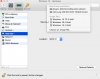
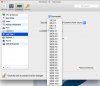
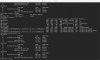
I have attached screen grabs for you to advise me on how to proceed.
My BC partition is disk0s3 as you can see from the Terminal grab. I have no idea what to select in the other 2 options within Parallels (see 2 other attachments).
I have a similar problem. I just installed Windows 8.1 in a bootcamp partition on my new 12inch MacBook. Bootcamp works fine, I can boot Windows 8.1 without any issues. However, when I tried to use Parallels 10 to create a vm from the bootcamp partition, parallels failed to see the bootcamp partition and does not present a bootcamp option. I also tried manually creating a vm like explained in the above link, but my bootcamp partition is not visible in the hard disk dropdown.
Problem was solved by 2nd line support. Look below, this worked for me:
Currently, Windows 10 OS is under experimental support in Parallels Desktop 10. Please follow the knowledgebase article http://kb.parallels.com/en/122808 in order to create Windows 10 Technical Preview Boot Camp virtual machine as a workaround.
Currently, Windows 10 OS is under experimental support in Parallels Desktop 10. Please follow the knowledgebase article http://kb.parallels.com/en/122808 in order to create Windows 10 Technical Preview Boot Camp virtual machine as a workaround.
I also tried article 122808 with my Windows 10 Bootcamp - which makes the image visible to Parallels, but unbootable. I had to revert to the original volume.inf file to restore functionality. The volume.inf that comes with Windows 10 is much larger than the one downloaded from the article, and is XML, not binary. Any ideas?

Hi all,
Please submit a Problem Report ID http://kb.parallels.com/9058 and provide us the ID number here, so that we can check and assist you better on this issue.
Please submit a Problem Report ID http://kb.parallels.com/9058 and provide us the ID number here, so that we can check and assist you better on this issue.

Ram@Parallels
Parallels Support
Hi Tony, Please check your inbox and respond.
It's a shame that this hasn't been fixed in the just released 10.2.1 (29006) update. I truly wonder if anyone at Parallels is even aware of the problem with the 12-inch MacBook. If we have to wait (& pay) for Parallels 11, I'll be most disappointed.I've just uploaded a Problem Report, ID 64091091, with my system Info. As I mention above, my problem is a known limitation with current latest Parallels rev, not able to see a Windows 10 Bootcamp image to mount as a VM within OS X. Thanks
Hi Tony,
Please check your private message.
Please check your private message.
Hi Dhruba, would you be able to share any updates for the rest of us? I visit this forum thread almost every day in hopes that this issue would reach a resolution. I believe that you have already received many Problem Reports from us 12-inch MacBook users eagerly waiting to use Parallels with our Boot Camp partition. Even a message saying that a solution is not forthcoming in the near future would be helpful. Thank you!
@HubertC I can tell you from my own open ticket that all I was recommended yesterday by support was to try the manual install method in the KB already tried by AzizU1 above - and which he'd already stated didn't work - then asked to submit a second Problem Report after that so that it could be escalated to second level support (although the PR was of course the same as the first). So clearly the message hasn't been getting through yet and the process has been ... interesting.
@HubertC For your reference, here's the latest received on my ticket re. Boot Camp on 12-inch MacBook not being visible:
"The issue is handled by the Second line Technical Support now. Our Development Team is already aware on this issue and they are working to address it in one of the future builds of Parallels Desktop for Mac. To enable automatic updates, from the Parallels Desktop Menu, select Preferences > General > Download Updates Automatically. While we do not have ETA for the fix, it has been prioritized appropriately and you can track the changes in the product at http://kb.parallels.com/122720"
So that's something at least.
"The issue is handled by the Second line Technical Support now. Our Development Team is already aware on this issue and they are working to address it in one of the future builds of Parallels Desktop for Mac. To enable automatic updates, from the Parallels Desktop Menu, select Preferences > General > Download Updates Automatically. While we do not have ETA for the fix, it has been prioritized appropriately and you can track the changes in the product at http://kb.parallels.com/122720"
So that's something at least.
@TonyG1 That's the same message I received a few weeks ago. They closed my ticket and marked the issue as resolved with the assurance that it was really not resolved.
It seems like Tier 1 Technical Support is only limited to providing solutions that are documented in KB articles. Even after trying to convince Tier 1 that I tried all KB solutions to no avail, they had to see it for themselves on my 12-inch MacBook with LogMeIn Rescue before they escalated the issue to Tier 2.
I'm pretty sure they are prioritizing this based on the number of users who are complaining about this exact problem. Since this is a very short forum thread, it is probably low priority.
I wonder if the new 13 and 15-inch MacBook Pros are facing similar issues. Perhaps the SSDs in these new MBPs are also configured in the same manner.
For now, until we hear from an actual Tier 2 Technical Support person, I don't think Tier 1 will be much help to us. Parallels Support only lets end-users talk to Tier 1 representatives.
Thanks for your reply!
It seems like Tier 1 Technical Support is only limited to providing solutions that are documented in KB articles. Even after trying to convince Tier 1 that I tried all KB solutions to no avail, they had to see it for themselves on my 12-inch MacBook with LogMeIn Rescue before they escalated the issue to Tier 2.
I'm pretty sure they are prioritizing this based on the number of users who are complaining about this exact problem. Since this is a very short forum thread, it is probably low priority.
I wonder if the new 13 and 15-inch MacBook Pros are facing similar issues. Perhaps the SSDs in these new MBPs are also configured in the same manner.
For now, until we hear from an actual Tier 2 Technical Support person, I don't think Tier 1 will be much help to us. Parallels Support only lets end-users talk to Tier 1 representatives.
Thanks for your reply!
@HubertC Hmm, the plot thickens! Thanks for the info.
Oh well, enough time wasted on this one, I guess I'll just wait to be pinged about an update. VMWare engineers have so far been much more open about discussing the core issue - different SSD sector sizes - with their users in their forum, so if they get to a solution first I guess I'll be jumping ship. Some companies just don't want to keep their customers
Oh well, enough time wasted on this one, I guess I'll just wait to be pinged about an update. VMWare engineers have so far been much more open about discussing the core issue - different SSD sector sizes - with their users in their forum, so if they get to a solution first I guess I'll be jumping ship. Some companies just don't want to keep their customers
Parallels support is god-awful. I had similar experience as above. Tried to help them with information that their own KB on Windows 10 volume.inf file replacement didn't work, they wanted to waste my time with remote session, rather than share with development or escalate. Kept closing the ticket over and over. Then tried sending me a attachment with new volume.inf file that was supposed to fix, but no attachment, and 3 (THREE!!!) different replies that attachment missing, ticket closed/reopened, etc STILL haven't resolved this. They need to get the damn support out of India and involve some people with comprehension skllls, who give a shit about their customers.