Parallels Desktop keeps asking for permissions -- how to stop?

ScottB47

Bit poster
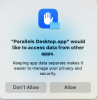
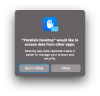
At least once a day, and every time I launch Parallels Desktop for Mac, it asks me to allow it to access data from other applications. I see no reason to allow this, and so far the lack of this permission has not hindered its operation. How do I make it stop asking this?
Thanks,
Scott
 
No answers? Drat. I am getting the same message, and it re-appears no matter which way I answer it. Install a new update of Sonoma, and the message comes back. Close the virtual machine and Parallels, and restart - the message reappears.
I'm also getting a message that seems to be from MacOS Sonoma that something about Parallels is incompatible with upcoming versions of MacOS.
 
No answers, sadly. I'm not seeing any compatibility messages, though. Are you running the latest version of Parallels?
 
No answers, sadly. I'm not seeing any compatibility messages, though. Are you running the latest version of Parallels?
Hello,

Thank you for your feedback.

Can you please share a screenshot of the pop-up?

Also, please collect a technical report (right-click Parallels icon in Dock > Help > Send technical data > check "Attach screenshots..." > press Send Report) and send the report's 9-digit ID in a reply.

Thank you!
 
Technical Report 447875905 has been sent with a screenshot, also attached here.
Scott
 

Attachments

  • Parallels request.png
    Parallels request.png
    52.4 KB · Views: 32
Is there a solution for this problem yet? It also happens with me, after updating Mac OS to the latest version. It's driving me nuts :)
 
Maybe a small correction. Parallels wants access to my Documents folder and keeps asking over and over again when launching a VM. Since I have file access to the host system disabled, Parallels most definitely needs absolutely no access to my Documents folder. It has absolutely nothing to do there.
 
Hi,
I have got same problem... no any answer? Please, if anyone can find the solution write it to us ;)
Boris
 
Last edited by a moderator:
giphy.gif
 
Thank you nickster2133! It was already there even, just needed me to toggle it to on, now I'll never have to see that warning again.
 
Back
Top