
Install the app
How to install the app on iOS
Follow along with the video below to see how to install our site as a web app on your home screen.
Note: This feature may not be available in some browsers.
You are using an out of date browser. It may not display this or other websites correctly.
You should upgrade or use an alternative browser.
You should upgrade or use an alternative browser.
Parallels Desktop for Mac computers with Apple silicon M4 chips
- Thread starter Mikhail Ushakov
- Start date
-
- Tags
- apple silicon m4 chip
I'm running 20.2.2 (55879) on my M4 Pro Mac mini.Same problem here, Parallels 19.4.2 (54991) refuses to install ARM Windows 11 on M4 :-( Did anyone find a solution other than buying (yet) another licence?
Parallels 18 just isn't working for me on my M4 MBA, the support pages tell me this is because it's running the newest version of MacOS, but this isn't true, my M2 MBA was and it works absolutely fine. I don't see why it wouldn't work and already had to upgrade to 18 and don't want to be forced to upgrade to 20, is this going to happen constantly? A purchase won't be enough to last for a few years, I might have to opt out of Parallels at this point.
I have Parallels 19 running on my Mac book air and it was working fine, but won't install any new OS on my new M4 Max Studio. Once I upgraded to Parallels 20 then everything is now working normally like nothing wrong has happened.
HMMMM, an indirect way to force people to upgrade ? Who ever that came up with this idea in the executive need to be transparent to Parallels Customers, that a constant development of this software cost money and on each version of the software we would like to keep the support at a certain point. Then people would surely understand the company situation. By using this sneaky tactic to force people to upgrade will only generate more resentments instead of more sales by genuine understanding. I am telling you, doing business just for generating money without compassion will not last.
HMMMM, an indirect way to force people to upgrade ? Who ever that came up with this idea in the executive need to be transparent to Parallels Customers, that a constant development of this software cost money and on each version of the software we would like to keep the support at a certain point. Then people would surely understand the company situation. By using this sneaky tactic to force people to upgrade will only generate more resentments instead of more sales by genuine understanding. I am telling you, doing business just for generating money without compassion will not last.
I am running Parallels Desktop 20.2.2 on macOS 15.3.2 with a MBA M4. I installed a macOS VM which is also 15.3.2.
I find when scrolling (with the built in trackpad) in a browser on something like YouTube the whole VM freezes, sometimes for a fraction of a second other times for multiple seconds. CPU doesn't seem to be spiking as I have Activity Monitor open both in the VM and host machine.
I also found that USB drives don't seem to work in the guest macOS VM at all. In the USB menu the guest macOS VM doesn't even appear to come up as an option to map the USB drive to.
My questions:
Is it normal for a VM to freeze like this when scrolling?
Is it normal that USB drives can't be seen in the guest macOS VM?
Does anyone know if there are any work arounds to both of these issues? Thanks!
I find when scrolling (with the built in trackpad) in a browser on something like YouTube the whole VM freezes, sometimes for a fraction of a second other times for multiple seconds. CPU doesn't seem to be spiking as I have Activity Monitor open both in the VM and host machine.
I also found that USB drives don't seem to work in the guest macOS VM at all. In the USB menu the guest macOS VM doesn't even appear to come up as an option to map the USB drive to.
My questions:
Is it normal for a VM to freeze like this when scrolling?
Is it normal that USB drives can't be seen in the guest macOS VM?
Does anyone know if there are any work arounds to both of these issues? Thanks!
I've spent a whole day more or less working with a macOS VM under Parallels Desktop 20.2.2 and my conclusion is that it's pretty unreliable and unstable. It freezes for long periods of time. Sometimes it recovers from the freeze, other times the screen goes blank and you have to shut the macOS VM down completely to get it back up and running. I find that my MBA M4 runs very hot too.
This is not the best advert for Apple's Virtualisation framework, nor Parallels!
How is it best to contact Parallels support?
This is not the best advert for Apple's Virtualisation framework, nor Parallels!
How is it best to contact Parallels support?
I perhaps first posted this (https://forum.parallels.com/threads...r-with-parallels-20-on-macbook-pro-m4.366259/) in the wrong forum.
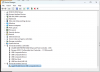
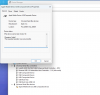
But I've installed Parallels 20.1.3 (55743) on my Macbook Pro v4 running Sequoia 15.2. I have it running Windows 11 Home (10.0.26100 Build 26100). However, when I connect an iPhone 13 Pro (running iOS 18.2) to the USB-C port and add it as an external device to Windows 11, the iPhone is recognized with a "Trust this Device" challenge. But then the Apple Mobile Device USB Composite Device always gives me a "This device cannot start. (Code 10)" error and my iPhone isn't recognized in the Windows file system, through iTunes, through Apple Devices, through Apple Music, etc.
I've reinstalled Parallels, Parallels Tools, Windows 11 Home, iTunes (both the Microsoft Store version and the downloadable 64-bit desktop version 12.13.4.4), Windows USB drivers, tried every different USB-C port, tried different USB-C cables to no avail.
My hunch is that there is some driver incompatibility between the Windows 11 Home Apple/iPhone USB drivers and Parallels on a MacBook Pro M4 ARM architecture. The impact being that I am unable to connect my iPhone at all to Parallels-hosted Windows, which is a major limitation for me.
Anyone else face similar challanges or have suggestions?
Btw, I noticed that with the recent Parallels updates, this same problem has returned on Parallels: the drivers for my iPhone on my M4 fail to load:
Processor Apple Silicon 3.20 GHz (4 processors)
Installed RAM 6.00 GB
System type 64-bit operating system, ARM-based processor
Edition Windows 11 Home
Version 24H2
Installed on 12/18/2024
OS build 26100.3624
Experience Windows Feature Experience Pack 1000.26100.66.0

MichaelP98
Junior Member
I've been using Parallels Desktop on my Mac with the M4 chip, and it's been fantastic so far. The performance is impressive, and I can run Windows apps seamlessly without any major hiccups. The integration with macOS is smooth, which makes multitasking easy. Also, if anyone's looking into app development while using Parallels, I came across this iOS app development service that might be helpful.
Btw, I noticed that with the recent Parallels updates, this same problem has returned on Parallels: the drivers for my iPhone on my M4 fail to load:
Processor Apple Silicon 3.20 GHz (4 processors)
Installed RAM 6.00 GB
System type 64-bit operating system, ARM-based processor
Edition Windows 11 Home
Version 24H2
Installed on 12/18/2024
OS build 26100.3624
Experience Windows Feature Experience Pack 1000.26100.66.0
View attachment 23423 View attachment 23424
This problem still hasn't been fixed in this week's latest Parallels distribution and install.
Again, connecting an iPhone to Windows running on Parallels results in driver failures (see attached screenshot). Configs:
Parallels Standard Edition Version 20.2.0 (55872)
Macbook Pro v4 running Sequoia 15.4.1
Running Windows 11 Home v24H2 (26100.3915)
Where connecting an iPhone 13 Pro (running iOS 18.4.1) and turning it on for Windows via Parallels invokes an iPhone USB driver that fails to start.
The weird, different thing this time is each time I toggle the connection to the iPhone on or off within Parallels (running Windows Home), I receive a Trust challenge on the iPhone. The usual behavior would be it would challenge me once on the iPhone, and after confirming with my passcode it would no longer challenge me again during a session. Even when toggling the iPhone USB connection on and off and on again in Parallels.
hey people, how are you doing !? 
I am struggling, just a bit with my new MacMini and Parallel.
When I first installed the Parallels software on my Mac, everything was perfect-until I accidentally pressed something in the settings or unintentionally moved a file to the trash. In any case, since that moment, the system gives me the following error (Please see screen attached:
Unable to connect Hard Disk 1. (A file or device required for the operation of Hard Disk 1 does not exist or is used by another process, or you have no permission to access it.>>>
All this sounds like it's from another planet ))
Could someone please jot down some bullet points on what I should do to bring it back to life ?
))
Could someone please jot down some bullet points on what I should do to bring it back to life ?
That would be amazing, as I can't find a suitable solution in any help resources...
Cheers,
Max
I am struggling, just a bit with my new MacMini and Parallel.
When I first installed the Parallels software on my Mac, everything was perfect-until I accidentally pressed something in the settings or unintentionally moved a file to the trash. In any case, since that moment, the system gives me the following error (Please see screen attached:
Unable to connect Hard Disk 1. (A file or device required for the operation of Hard Disk 1 does not exist or is used by another process, or you have no permission to access it.>>>
All this sounds like it's from another planet
))
Could someone please jot down some bullet points on what I should do to bring it back to life ?That would be amazing, as I can't find a suitable solution in any help resources...
Cheers,
Max
Attachments

MichaelP106
Bit poster
My Mac Mini M1 chip with 8gb of ram struggles to run Windows 11 in Parallels 20. Considering upgrading to the M4 or M4pro. Will 16gb of unified memory solve the problem or should I go with 24gb?
Hi,Hi there!
Parallels deeply cares about the quality of our products and the experience they provide.
This thread has been created to share feedback on the work in Parallels Desktop on Mac computers with Apple M4 chips. Don't hesitate to share your experience!
I'm a design engineer and my work is heavily dependant on parametric 3D modelling software - Solidworks, is a windows program. How well can I expect this to work on Mac Studio M4 Max?
- No problem running, expected bugs or not possible?
Thanks
I feel like I am barking up the same tree as the rest of you folks. I had version 20.??? and went to update, which not only failed but it corrupted my VM."A file or device required for the operation ddoe not exist <etc...>" So I called Parallel for help.
A guy took over my machine and created a new virtual machine. But now I have to redo everytthig that I had been working so hard to get working but wasn't ready yet. On top of all of that "redo from scratch stuff, I have no idea what I had do and I'm beginning to suffer cognitave impairment. I guess Parallels thinks that getting a virtual machine is about the best they can do in a situation like this.
What I really needed is for someone to help me get my corrupted vm uncorrupted so that I can pick up with where I was going before all went a foul. Does anyone know if there is a way to to fix this mess without my having to redo multiple months of hard work just to back to step 1 again.
What gauls me most is that with all this Parallels Cares stuff, the associate didn't even asked me what I wanted, as though he already KNEW.
A guy took over my machine and created a new virtual machine. But now I have to redo everytthig that I had been working so hard to get working but wasn't ready yet. On top of all of that "redo from scratch stuff, I have no idea what I had do and I'm beginning to suffer cognitave impairment. I guess Parallels thinks that getting a virtual machine is about the best they can do in a situation like this.
What I really needed is for someone to help me get my corrupted vm uncorrupted so that I can pick up with where I was going before all went a foul. Does anyone know if there is a way to to fix this mess without my having to redo multiple months of hard work just to back to step 1 again.
What gauls me most is that with all this Parallels Cares stuff, the associate didn't even asked me what I wanted, as though he already KNEW.
hello there
i just migrate from mba m1 to mba m4, i have paralles 18 and i can not install the vm
tried to:
reset the mac
new user
copy from vm disk
install from .iso
nothing worked
my mac os version is the latest
id 496033053
i just migrate from mba m1 to mba m4, i have paralles 18 and i can not install the vm
tried to:
reset the mac
new user
copy from vm disk
install from .iso
nothing worked
my mac os version is the latest
id 496033053
Attachments

My Mac Mini M1 chip with 8gb of ram struggles to run Windows 11 in Parallels 20. Considering upgrading to the M4 or M4pro. Will 16gb of unified memory solve the problem or should I go with 24gb?
24 GB... certainly! Windows 11 works better with 8 GB or more on Intel; this would require a 16 GB Mac on Intel, or a 24 GB on an M-series processor. Because some of that RAM is also used by the GPUs on M-series processors, the additional memory will ease the congestion of memory usage between the CPU and GPU, otherwise Parallels may find itself out of memory too quickly, causing virtual memory thrashing.
I found 16 GB a bit tight running Windows 11 on an M-series Mac. 24 GB will certainly make things better.
OK, let's begin with this decision... do you want to run an ARM-based Windows virtual machine or an Intel one?
If you want to run an Intel one, you may not like the outcome. However, the reason I am presenting this option first is because you mentioned "... want to copy all the files and apps...". If you indeed want to copy your apps over to a virtual machine, you will need to consider that for this to work, you need:
1) a way to make disk images of your PC's boot disks into Parallels Desktop disk image files, and
2) to be content with running your Intel-based software under a virtual machine with only one 1.7 GHz processor and 8 GB of RAM. If your PC is well superior to that, and you're running complicated software packages on your PC right now, the Intel-based solution is not going to work for you.
The alternative is to build an ARM-based system, but as you have mentioned, PC Transporter is not going to work. The best way to copy your stuff is to build your ARM-based Windows system on your Mac M1, get your PC fired up and set up SMB file sharing for all the disks on your system, and copy your files that you want to migrate over to your M1 over Ethernet (including Wi-Fi).
Or use a portable USB drive as a shuttle.
I like the Ethernet solution better, so to make that work, connect your Mac to your PC using your Default Adaptor setting for an available Wi-Fi or Ethernet port, and log into your PC from your Mac using the Windows environment.
If you want to run an Intel one, you may not like the outcome. However, the reason I am presenting this option first is because you mentioned "... want to copy all the files and apps...". If you indeed want to copy your apps over to a virtual machine, you will need to consider that for this to work, you need:
1) a way to make disk images of your PC's boot disks into Parallels Desktop disk image files, and
2) to be content with running your Intel-based software under a virtual machine with only one 1.7 GHz processor and 8 GB of RAM. If your PC is well superior to that, and you're running complicated software packages on your PC right now, the Intel-based solution is not going to work for you.
The alternative is to build an ARM-based system, but as you have mentioned, PC Transporter is not going to work. The best way to copy your stuff is to build your ARM-based Windows system on your Mac M1, get your PC fired up and set up SMB file sharing for all the disks on your system, and copy your files that you want to migrate over to your M1 over Ethernet (including Wi-Fi).
Or use a portable USB drive as a shuttle.
I like the Ethernet solution better, so to make that work, connect your Mac to your PC using your Default Adaptor setting for an available Wi-Fi or Ethernet port, and log into your PC from your Mac using the Windows environment.