Parallels Desktop for Mac build 3170 RC3 is available for download.

Numlock indicator

joem said:
There have been MANY reports here that the clear key (if you have one) performs the numlock function. Search is your friend.

Since the newer Apple USB keyboards do not have a numlock light, I have requested many times to put a numlock indicator in the Parallels status bar.
 
NeoDynamic said:
Hi dgoodin,
I also had this problem it seems that Parallels does an auto login on the Administrator account. It uses a really bad practice of a blank password. It took me a while to figure it out too. You can set your password for the Administrator account but you'll have to do the following:

1. Wait for windows to get to that point where it seems to stop.
2. Hit Alt Tab and you'll notice a second window opened. This is the auto login that failed
3. Click on the OK for the failed password attempt
4. Login as normal.

If you run in Coherence mode you won't see the failed login; it's hidden behind the "Start Windows" screen. You will see it when you run in Full Screen mode.

If you're listening Parallels people - on the install process allow the user to set the password for administrator and _not_ have a blank password. Secondly let the user select the acount for auto login in the VM Settings

BTW It would be good if the Parallels representitives made posts here :)

Cheers

The auto login functionality isn't Parallels... it's WINDOWS.

If you want to change Windows AutoAdminLogin do the follow:

In Windows
Select RUN.
Type REGEDIT and press enter.
Navigate to HKEY_LOCAL_MACHINE\SOFTWARE\Microsoft\Windows NT\CurrentVersion\Winlogon

To ENABLE/DISABLE AutoAdminLogin modify AutoAdminLogin key.
1 = ENABLED / 0 = DISABLED

Notice DefaultUserName, DefaultPassword and DefaultDomainName (if applicable) keys.
Both of these can be modified if you want to login as a different Windows user, etc.

This is common Windows functionality. We shouldn't pollute Parallels forums with this non-sense.
 
I thought it was out because it was reported everywhere else. But I can't seem to find the download. Sigh...
 
is there a mirror? the official download drops in at ~20K/s. i'd love to get it at, say, 400K/s or something. ;)
 
lucky bas... - my downloads die after a couple of minutes at less than 20K/s. :/ tried Safari, tried Firefox, now trying curl in Terminal. Same thing, so I'd say this is connection/serverside. :(
 
Can anyone who actually downloaded the new build plese post the md5sum of the dmg? I've been trying, but it keeps dying on me. I may have found a copy from a non-official source, and I want to make sure it's the same file.
 
ZeeG said:
Impossible to download!
BTW, does this version include Parallels Tools for Linux?

The load exceeded server capacity - not unexpected given the level of anticipation built up for the release. No tools for Solaris or Linux.

The release includes Kapersky anti-virus for Windows which should demonstrate the Windows-centric energy in the company. Pardon my yawn...
 
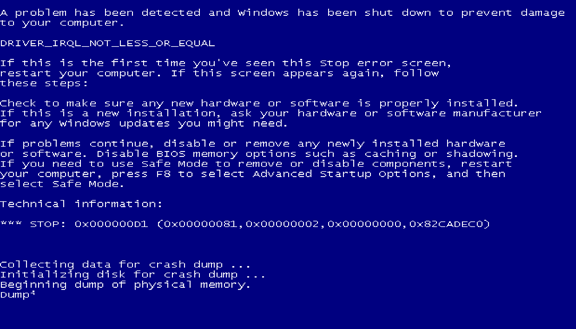
Vista stop error - anyone know what this screenshot means?

Hey. Problems with Vista, anyone know what this error (see screenshot) is coming from?

SPECS: Build 3170 (3186 is taking WAY long to download and try), Macbook, newly installed VM with Vista. Only other software installed is Office 2007, Avast (Vista compatible version). No additional hardware attached.

SCENARIO: I shutdown Windows, Parallels goes into "pause" mode. I move it back into "continue" mode. It jumps to the screen with my name/icon... then in a few secs (without any action on my part), I get this blue screen and error.

Picture%203.png
 
Mersault said:
Can anyone who actually downloaded the new build plese post the md5sum of the dmg? I've been trying, but it keeps dying on me. I may have found a copy from a non-official source, and I want to make sure it's the same file.


I'm downloading it at work - I'll have the file in another 18 mins.
I could do an md5sum and possibly host the file for a few hours.
 
Back
Top