Parallels Desktop for Mac build 3120 RC1 is available for download.

VPN Connectivity.

I believe VPN connectivity in build 3120 RC1 is better, however I'm still dropping connections.

Previously I was dropping/reconnecting once every 5 minutes, that time has been increased however there are still issues.

MPB Core Duo / 2GHz
OS (host): Mac OS X v10.4.8 with all available updates
OS (guest): XP Pro Service Pack 2 with all available updates
RAM: 2GB
Parallels version: PD 3120 RC1
Parallels config: 512MB / Automatic Memory / Video 16MB / 1 HD / Network Adapter 1; Bridged.
RAM given to guest: 512MB

I'm connecting to my corporate network using a Citrix Access Gateway. This is essentially a SSL VPN tunnel. Client machine is running the Access Gateway client.
 
Coherence is one hungry SOB

When I run in Coherence mode, performance degrades drastically on my MBP. To the point of hanging my machine. Without Coherence, everything is zippy like it was. I am fine without Coherence, but would be willing to provide info as desired.

B

MBP C2D 2.16
2GB RAM
200GB HD

Fully patched system

Parallels running in Boot Camp mode
768MB dedicated
32GB Fat32 partition
 
Network connections

I just wanted to follow up on my issue with 3120 dropping network connections.

In using Outlook unless I leave the folder of my mapped drive open, in this case 'Z' ten Outlook gets confused where the data is.

I have verified that if I leave open the mapped folder, Outlook is fine, if I close it, then Outlook has an issue opening or the rules processing on new incoming email.

Even if the drive is still mapped. Seems 3120 does not handle mapped drives well. This would explain the VPN issue too I think a user is having.

Please improve this issue as Outlook email can be easily corrupted in this cobndition.

MG
[email protected]
 
ActiveSync - PocketPc kills VM and Macbook Pro

I am assuming this is a similar issue to the iSight webcam issue which I confirm I have on the MacBook Pro... light on no video sending.

If I install ActiveSync 4.2 t sync my PPC wth Outlook and tell 3120 to connect my Pocket PC USB device, then 3120 locks up and the MacBook freezes and a battery pull is required.

I did this twice to confirm and same result. So it hurts when I do this... so I won't do this any longer.

Only one USB device connected - the Verizon/Sprint PPC 6700 Windows Mobile 5 phone.

So basically ActiveSync and a Pocket PC is a DoS for 3120.

Any thoughts on this issue ?

Thanks,

MG
[email protected]
 
If you can - try opening a folder over the VPN and see if this keeps the connection open. I have to do this for a mapped share so Outlook can find a data file.

MG
 
maynard said:
If you can - try opening a folder over the VPN and see if this keeps the connection open. I have to do this for a mapped share so Outlook can find a data file.

MG

Something like that may work... I've also been told to create a script that continuously pings an address over the network. Apparently this traffic keeps the VPN tunnel open.

This isn't an issue with VPN tunnels it's Parallels. I was working fine with no issues until the Beta.

While I appreciate the suggested workarounds we shouldn't have the type of behavior. I have other methods of connecting into the office however VPN tunnels are preferred.
 
Frequent audio related crashes

I've been running build 1970 for a couple weeks now and getting along with it quite well. I work from home and use VPN running in Windows XP to connect to work. I use Nortel's IP Softphone 2050 to call people at work. I would use Audacity to test my mic before calling to make sure it was working. This all worked well in build 1970.

This morning I upgraded to build 3120. IP Softphone and Audacity now both cause Parallels to crash frequently (about 1 in 3 uses). When IP Softphone does work I will eventually lose my mic and/or sound after a few minutes. Audacity will crash on exit about 4 out of 5 times (when it doesn't crash Parallels) so this is very easy to reproduce.

A coworker of mine has a near identical set up and has no problems at all. The only difference between us we can discern is that he is using a first generation Macbook Pro and I am using a second generation.

I rebooted several times to no avail. I've gone back to build 1970 and everything is working fine again.

Hope this helps. Coherence was great but I won't upgrade again unless these problems can be fixed. Can anyone else get Audacity to work in Windows under Parallels 3120 on a second generation MacBook Pro?

Corey
 
Problems with LaCie USB drives (F.A. Porsche edition)

Hi all,

this is my first post and I'm just a new owner of a MacBook Pro (my first Mac) and this computer with your product is simply amazing.

I have to use also a Windows XP for some programs running on university's server, and I have to use an external USB disk too. For this reason, I've insalled the new release cadidate 3120 but, when I connect my LaCie USB drive, it is recognized (or it seems to be recognized) but it doesn't appears on the list of available devices...so it's inaccessible.

With a normal USB memory stick, instead, there aren't problems.

Could you please tell me a solution, or try to fix this bug in new Paralles Desktop for Mac version?

Thanks in advance,

Kind regards.

P.
 
Memory Link in 3120 rC1

Same thing here; definate memory leak; I've seen the OS X vm allocation for Parallels jump as has as 2.5 GB grinding the entire machine to a halt. Going to try and downgrade immediately.

terryhatmaker said:
I am running windows xp service pack 2 and the RC1 candidate. This has release has taken my MacBook 2 GHz with 2 GB RAM hostage. I am seeing the RAM usage creep up during usage and the biggest problem is that it takes over any where from 40-60% of the CPU usage. My MacBook sometimes acts like it is hung because there is so little CPU. This occurs with Parallels in the background. I am thinking I want to go back to the previous beta release!

Terry Hatmaker
 
BillInSoBe said:
Something like that may work... I've also been told to create a script that continuously pings an address over the network. Apparently this traffic keeps the VPN tunnel open.

This isn't an issue with VPN tunnels it's Parallels. I was working fine with no issues until the Beta.

While I appreciate the suggested workarounds we shouldn't have the type of behavior. I have other methods of connecting into the office however VPN tunnels are preferred.

I agree with you that this is a Parallels 3120 issue, I just figured if the folder thing worked for Outlook, it may be a work around for the VPN too. and Yes, ping is often a fix we use to keep IPSEC tunnels open, but that also means you have to allow ICMP pings and they are usually turned off on firewalls for obvious reasons.. I digress...

I agree something has been introduced in 312o that kills the network connection. I hope they fix it.

MG
 
Copy / Paste does not work in 3120

A new bug I found is that I cannot copy and paste from the VM in 3120.

Take a URL for example paste it in an email - use to work, now does not.

Please fix this one.

MG
 
RC1 - issue with resume

Thanks for the work, Parallels team.

I've been using RC1 for over a week now and it has been working fine.

I have one issue -- as I've begun to use it more often, I have started suspending the virtual machine when I am in Coherence mode. When restarting a suspended machine in coherence mode, the Windows task bar appears on the desktop, but it takes quite a while longer before it can start responding to input, and there is no visual sign that it is not ready for input.

Today I was starting the machine, I was moving my mouse over the Windows task bar to see if the icons were responding yet, and I clicked the Start menu. Part of the Start menu appeared, the rest of the rectangle was filled in with the Windows desktop. I waited for several minutes for Parallels to finish restarting the guest computer and start responding, but it seemed to have hung up. So I shut it down and restarted.
 
Still serious bug when selecting Hide Others in another application

:mad:

Select Coherence mode
Open a win application (e.g. Outlook)
Go to Finder
Select Hide Others
Go back to Parallels
All windows is gone (as it should be)

Select the win application you opened a while ago
No windows shows up - no matter what you do

Force Quit is the only solution

Is this reproducable?

If this is a acknowledged bug it should be removed before a shart version...
 
hasseogtage said:
:mad:

Select Coherence mode
Open a win application (e.g. Outlook)
Go to Finder
Select Hide Others
Go back to Parallels
All windows is gone (as it should be)

Select the win application you opened a while ago
No windows shows up - no matter what you do

Force Quit is the only solution

Is this reproducable?

If this is a acknowledged bug it should be removed before a shart version...

If I use the Applications Menu Item for Parallesl and then select the Windows Application there, it comes back.

I can also click and hold on the Parallels icon on the Dock and a "Menu" pops up with a selection called "Show" which brings back ALL of the Windows Apps.

In any event I don't need to Force Quit.

Or am I misunderstanding what you're trying to do?
 
I don´t think you misundertand me.
On my system the "Show" selection from the Parallels icon does not perform anything. Also when I click on the dock icons or choose the apps in the application menu the apps is still without windows. I´m running 2 monitor system but use only the main monitor for the PC. I'll try to kill some 3 party haxies to see if it helps.

Thank you for trying to solve my problem!
 
My bugs

Sorry if I'm repeating someone else, but I can't read through the entire thread. Here is my list of bugs for this version. Overall, I have to agree with one post I read though that this release is much less stable than the last one, which doesn't bode well for a RC.

1) When clicking on my VM XP Boot Camp desktop shortcut, Parallels always unmounts my Windows volume and then says it can't load the Boot Camp partition. If I then hit start, it loads up normally.

2) Every time I run Parallels, I immediately lose 1GB of disk space (understandable), but sometimes the app immediately gobbles up 4GB of disk. Why does this happen? Regardless of that, on quitting Parallels the normal way, my disk space is never completely freed up and I usually lose from 500MB - 1GB of space until I restart the machine. This is unacceptable.

3) Parallels never remounts my Windows volume after quitting. This may somehow be tied to #2 above?

4) I'm still getting the Parallels Tools overlay warning on every startup.

5) I've also noticed a very gradual memory leak.

6) Booting into Boot Camp still requires me to activate Windows, while booting into Parallels does not.

My setup is a 2.13 C2D MBP running 10.4.8.

Thanks for all the hard work and looking forward to the next release!
 
Last edited:
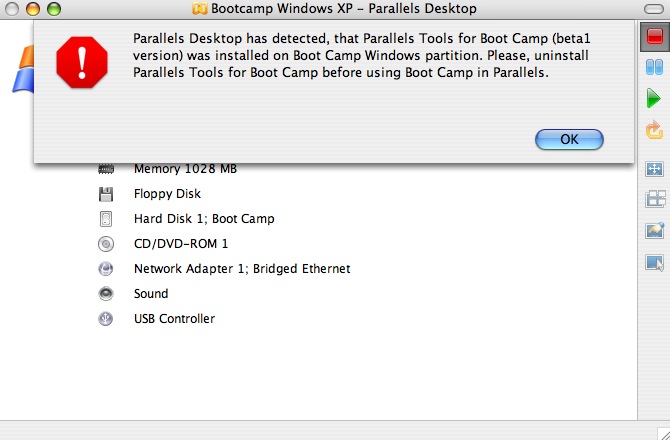
Parallels Tools for Bootcamp (beta 1 version) was installed....

Hello All,

I'm getting a nag screen "Parallels Desktop has detected, that Parallels Tools for Boot Camp (beta1 version) was installed on Boot Camp Windows partition. Please, uninstall Parallels Tools for Boot Camp before using Boot Camp in Parallels."


361763883_11ffc66a88_o.jpg


Parallels tools is removed and I am unable to boot into Bootcamp any more.
Does anyone know what Parallels is checking to determine that Parallels tools is installed, is there a way to force around this nag screen, or to remove the file or directory in the BootCamp partition that is causing this incorrect alert.

Also, when I attempt to boot into BootCamp I choose the profile and I get a black screen that doesn't boot XP.

I've also noticed that AUTOEXEC.BAT, CONFIG.SYS, IO.SYS and MSDOS.SYS are zero byte files (when I check them from the terminal with the "file" command in OS X).

Please help! I can't reformat and start again as I have some stuff on there I need. yes, I know its Beta software :-)

PLEASE HELP ME!

Thanks in advance!

-- p.
 
Last edited:
VPN Connectivity.

maynard said:
I agree with you that this is a Parallels 3120 issue, I just figured if the folder thing worked for Outlook, it may be a work around for the VPN too. and Yes, ping is often a fix we use to keep IPSEC tunnels open, but that also means you have to allow ICMP pings and they are usually turned off on firewalls for obvious reasons.. I digress...

I agree something has been introduced in 312o that kills the network connection. I hope they fix it.

MG

I've done additional testing and running a continuous ping DOES NOT fix the issue. I tired this for the better part of yesterday with no luck whatsoever. VPN connection continued to lag then drop followed by a reconnect.
 
This is related to RH4 high CPU usage. I noticed that after some time the CPU usage start going up. This can take 3-4 hours of working/compiling on RH. Than I stop and do nothing while watching Mac and RH cpu usage. RH top show idle but mac shows ~50% cpu usage on both cores pointing to Parallels process. Any ideas? Please Please fix this

Same noticed under Windows. RH is set 256 Mb running init 3 and Parallels memory setting set to Auto.
 
Add me to the list...

Add me to the list of people who have network dropouts every few minutes running the latest beta.
 
Back
Top