Parallels Desktop for Mac build 3036 Beta is available for download.

Status
Not open for further replies.
Coherency

Hi All,

I have a MS Vista Virtual MAchine and I can not seem to get Coherency to work at all. I hit the button but it does nothing. Is there something I have to do to get it to run?

any help would be appreciated.

thanks,
Sal:)
 
I just upgraded to this build and I got it working after a few problems. Last night I booted into Boot Camp to play some Counter-strike. When I was done, I tried booting into my Boot Camp partition, but now I get a BSOD that says PAGE_FAULT_IN_NONPAGED_AREA. I can boot into Safe Mode with no problems, but when I go the normal route, it gets the BSOD. It worked before I went into Boot Camp, but afterwards it's hosed. Any ideas?
 
Good news (partially, at least)!

Well, after several failures last night, I tried to boot into BootCamp directly this morning again and my keyboard WAS recognized at the "pick a volume to boot from" screen and I was able to successfully boot into XP through Boot Camp. Of course I still get the "XP must be reactivated on this computer" message even though I had never even activated it under Parallels. I have ever only had one virgin installation of XP SP2 on this Mac (through BootCamp) and the only Parallels installation on this Mac is the new beta that allows the VM to just boot from the BootCamp XP install.
 
Last edited:
ehurtley said:
No, you cannot use an XP Pro Retail (or even OEM) key with an XP Corp edition. Again, you fix activation issues by using the Parallels Tools for Boot Camp. But... If you haven't changed the hardware, even if Windows gets de-activated, you can just re-activate, and it will work. (Assuming, of course, you're using a legal copy.)

FYI: It's a legal copy of XP Pro.
Exactly what are the Parallels Tools for Boot Camp supposed to do?
Naturally I've installed them. Otherwise, I would never get into my XP BootCamp inside Parallels !!

I'm starting to realize that only people with illegal or corporate editions are not affected.... (Since their copies don't check on changed hardware.)

Can someone from Parallels please confirm this?
 
OS Installation Assistant Issue

I uninstalled my previous version and installed this as I got errors when trying to do an upgrade install. Now EVERY TIME I open Parallels it apparently doesn't see any of my original .pvs files and the OS Installation Assistant pops up- If I cancel out of it, Parallels closes. I'm stuck with either going through the wizard to create a new .pvs file EVERY time, or launching my .pvs files directly (which is ugly). Anyone else expeirence this problem/have a fix?

Matt
 
Boot Camp Activation

Hi Parallels Gang,

Thanks for the great update! It's really incredible.

I also had the Windows activation problem when booting into my Boot Camp install using Parallels.

I did read the installation notes, and I did install the Parallels Tools for Boot Camp before launching the VM the first time.

I was able to boot natively back into XP via Boot Camp and reactivate (because the hardware hasn't actually changed); however, after rebooting again into OS X and relaunching Parallels, I was prompted to reactivate again.

I followed all of the directions in installer, including the Parallels Tools for Boot Camp installation, and picking the correct configurations and profiles when starting Windows.

I did have this experience: after the first boot of the Boot Camp Partition using Parallels, the instructions said that there may be "New Hardware Found" dialogues. I allowed those to continue, but several of them reported a failed status "Unable to find suitable driver for this hardware". I don't know if that has anything to do with the activation.

My Boot Camp Windows XP install is from a brand new Windows XP Pro SP2 disc recently purchased directly from Microsoft and installed onto a newly formatted Boot Camp partition. The only other software installed is Norton Antivirus 2005, Firefox, and several games.

Thanks for a great update guys; this has great promise; I'm sure it will be spectacular once the activation issues are ironed out.

Monte Krol
 
Fix for "stretched" windows in coherence mode

On my mac mini I was able to fix the stretched window while in coherence mode problem my setting the windows color depth to 24 instead of 32 bit (on a related note, this also fixes the dropping of the desktop to 8 bit color when hitting fullscreen mode on the 23" apple display)

I'm assuming this has something to do with the fact that the windows video driver for this parallels beta does not allow 32 bit color at 1920x1200 on the mac mini
 
Can't choose Bootcamp as an option for a Hard disk...

Hi!

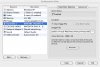
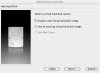
Here the "Use Bootcamp"-switch in the HardDisk settings window is deactivated?!? In the "Add Harddisk"-Wizzard it's deactivated too... (see the attached screenshots"

I booted into my Bootcamp XP and installed both, parallels tools for bootcamp and parallels tools...

What is wrong here??? Did I miss something??
 

Attachments

  • screenshot1.jpg
    screenshot1.jpg
    110.9 KB · Views: 47
  • screenshot2.jpg
    screenshot2.jpg
    48.6 KB · Views: 36
I've tried to use BootCamp with Paralles. I've downloaded PT for Bootcamp and I've installed them (however the installer seems to quit itself while registering something during the installation...however no crash reporter bring to me...so probability it's normal). Unfortunatly when I try to load the vm I receive and error: "Unable to Unable to open disk image Boot Camp. Why?thks
 
You can add another user to the list of FAT32 partiotions not being recognized in Parallels. I get the error message "Unable to open disk image Boot Camp!" everytime I try to boot my VM in Parallels. Guess I'll be using a disk image for now, on to a new install of Windows XP!
 
Bad hal.dll

Need help!

I am useing fat32. Wanting to use Boot camp with parallel, I install the boot camp tools in boot camp then restarted and chose parallel at black screen then it gives me. System32/hal.dll files is missing or corupt. It is there it is not missing.

and of course since that I cant use boot camp drive with paralel.

Has any one got this to work With FAT32 Format?
 
I'm usually the first to install new betas and builds, but in looking at this discussion, it seems like most of the improvements have to do with running various versions of Windows. Any changes for Linux that would make it worth installing the new beta?
 
Nice to have...

Great beta, this i impressive...

What I would like to see added:

- a windows utility/driver/program such that if a guest VM application starts the browser, email, music program, etc... it's the Mac version that is started in the host VM.

- a windows look and feel that makes it look like the Mac, there has to be one out there, maybe someone can post a link.

- a utlity to migrate my VM disk image files to the bootcamp partition.

Thanks
 
PetraHonig said:
the coherence mode is nice but I have very ugly large characters. Is there any chance to smoothen the fonts.

Andrew & Petra -

I've noticed the same on my Mini with a 23" Apple Cinema HD display and did some playing around with it. I think it may be something like a scaling issue between the resolution set for your Windows VM and your Mac desktop. I've noticed that if I set my Windows desktop resolution to be the same (or as close as it will allow, given the need for the Mac menu bar, etc.) as my Mac desktop then switch on coherence the windows look much closer to being indistinguishable from when they were running inside a Windows VM screen window. There's still some roughness in the fonts, but not as bad.
 
activate beta?

Hi all,

like the rest of you, I downloaded the latest build, however, I cannot activate it with my serial number. Bought Parallels only 2 or 3 weeks ago... Is this just a developer build?

Thanks,
Pit
 
Status
Not open for further replies.
Back
Top