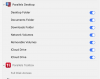
Parallels Desktop.app would like to access data from other apps

Thomas Okken

Bit poster
I'm getting the message "Parallels Desktop.app" would like to access data from other apps every time I launch a VM. I can choose between Don't Allow and Allow, but there appears to be no way to make that choice permanent.

This started happening a couple of months ago, when I was still running Parallels Desktop 18. I figured it had to have something to do with the MacOS Sonoma upgrade, and that the next version of Parallels Desktop would fix the issue, but unfortunately it is still happening after I upgraded to 19. How can I stop this dialog box from popping up on every VM launch?
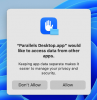
Screenshot 2023-12-05 at 14.46.48.png

I'm using a MacBook Air M1 with Sonoma 14.1.2 and Parallels Desktop 19.1.1. I have two VMs, each created by the Parallels VM creation wizard, one with Windows 11 and one with Ubuntu 22.04. Both VMs are affected.
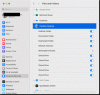
 
Out of curiosity, if you go into Settings > Privacy & Security > Files & Folders, does it look like this?

2023-12-05_09-02-11.gif

If it doesn't, then flip the switches shown to the ON position and see if that helps.
 
On my machine, under System Settings -> Privacy & Security -> Files and Folders -> Parallels Desktop, there are only four switches: Desktop Folder, Documents Folder, Downloads Folder, and Network Volumes. All four are set to ON.
 
On my machine, under System Settings -> Privacy & Security -> Files and Folders -> Parallels Desktop, there are only four switches: Desktop Folder, Documents Folder, Downloads Folder, and Network Volumes. All four are set to ON.
I'd email them and work with Tech Support at this point.
 
I'm getting the message "Parallels Desktop.app" would like to access data from other apps every time I launch a VM. I can choose between Don't Allow and Allow, but there appears to be no way to make that choice permanent.

This started happening a couple of months ago, when I was still running Parallels Desktop 18. I figured it had to have something to do with the MacOS Sonoma upgrade, and that the next version of Parallels Desktop would fix the issue, but unfortunately it is still happening after I upgraded to 19. How can I stop this dialog box from popping up on every VM launch?

View attachment 21753

I'm using a MacBook Air M1 with Sonoma 14.1.2 and Parallels Desktop 19.1.1. I have two VMs, each created by the Parallels VM creation wizard, one with Windows 11 and one with Ubuntu 22.04. Both VMs are affected.

Hi Thomas.
I have the same issue since I installed PD 19. Did you solved this problem?
 
Check your VM. You can right click and select Configure when the VM is shut down. Go to Options/Sharing and check your settings for Windows Sharing.
 
Hello,
I'm on mac studio M2 sonoma with Parallels desktop 17 for mac. All my setting are the same as explained here (I hope) but I keep getting this message every time I open Parallels. Attached is a screenshot of my settings, what am I doing wrong?

Thank you,
Shlomit
 

Attachments

  • Screenshot 2024-06-14 at 13.59.11.png
    Screenshot 2024-06-14 at 13.59.11.png
    80.1 KB · Views: 14
Solved - "Parallels Desktop.app" would like to access data from other apps (Very Annoying!)
Allow Full disk Access to Parallels.
System Settings-Privacy & Security-Full Disk Access
- Mac M2 Max, Parallels 19

But what if you don't want to give parallels full access to everything? For example I have some external drives with important data that I don't want any risk of Parallels/windows accessing/corrupting by accident, etc. Isn't there some way to permanently decide what you do/don't want it to have access to?
 
Back
Top