Parallels Desktop 19 Pro Edition M2 can't install FreeBSD 14 aarch64

WisonY

Bit poster
Parallels Desktop 19 Pro Edition Version 19.3.0 (54924)
MacBook Air M2 2022 (MacOS: Sonoma 14.2.1 (23C71))

FreeBSD image: FreeBSD-14.0-RELEASE-arm64-aarch64-disc1.iso
OS type: Other
CPU: 2
MEM: 8192

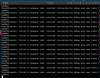
I can see the installation UI but keeps printing the following error after 10~20 seconds, CPU 100%, the console installation UI is gone, and nothing I can do except 'stop' the guest.

Code:
AcpiOsExecute: failed to enqueue task, consider increasing the debug.acpi.max_tasks tunable
........

Need help, thanks:)
 

Attachments

  • Screenshot 2024-04-24 at 4.27.15 PM.png
    Screenshot 2024-04-24 at 4.27.15 PM.png
    806 KB · Views: 3
I've already tried using a DVD file (FreeBSD-14.0-RELEASE-arm64-aarch64-dvd1.iso), but the issue is the same.
I've already tried to add `vm.bios.eif=1` to `Boot flags`, but the issue is the same
 
whit same error I could not login on my vm, I noticed when battery on charge, so:
press esc on splash for stop
OK show (if you want see variables)
if you disable all acpi (hint.acpi.0.disabled=1) system not start (error not event timer fund!)
so
OK set debug.acpi.disabled=acad
OK set debug.acpi.disabled=thermal
OK boot -> if all ok system start without problem

to fix edit /boot/loader.conf and add the same row:debug.acpi.disabled="acad"
debug.acpi.disabled="thermal"

if you need doc: freebsd man

I don't know if this can help you but for I have resolved...
 
whit same error I could not login on my vm, I noticed when battery on charge, so:
press esc on splash for stop
OK show (if you want see variables)
if you disable all acpi (hint.acpi.0.disabled=1) system not start (error not event timer fund!)
so
OK set debug.acpi.disabled=acad
OK set debug.acpi.disabled=thermal
OK boot -> if all ok system start without problem

to fix edit /boot/loader.conf and add the same row:debug.acpi.disabled="acad"
debug.acpi.disabled="thermal"

if you need doc: freebsd man

I don't know if this can help you but for I have resolved...

Thanks for the information, but I've already tried, it's doesn't help:)
 
Thanks for the information, but I've already tried, it's doesn't help:)
Did you ever figure this out? I have the same setup (7 Sept 2024) and get the same problem (
AcpiOsExecute: failed to enqueue task, consider increasing the debug.acpi.max_tasks tunable). I'm using the Parallels free trial. No way I'll but it if I can't get this to work.
 
Actually, you should try the FreeBSD 15 current, I saw it works in FreeBSD forum, forgot the link, just give it try☺️
 
Back
Top