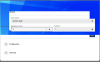
This only happens on the latest Ubuntu 22.04 VM and not on my old v20.04 one, that the UI gets messed --- please see attached, and it happens when I move the mouse over some of the elements like the buttons or drop-down box etc. This is with the latest Chrome browser Version 101.0.4951.64 (Official Build) (64-bit)
It does not repro on the same version of Chrome browser on my Ubuntu v20.04 VM, and does not repro with the FireFox browser. Could it be a video driver support issue that Parallels Desktop needs to address for the latest Ubuntu desktop OS? Thank you.
It does not repro on the same version of Chrome browser on my Ubuntu v20.04 VM, and does not repro with the FireFox browser. Could it be a video driver support issue that Parallels Desktop needs to address for the latest Ubuntu desktop OS? Thank you.