Parallels Desktop 17 on macOS Sonoma wrong app name in app menu
- Thread starter AronS1
- Start date
-
- Tags
- parallels desktop 17
Follow along with the video below to see how to install our site as a web app on your home screen.
Note: This feature may not be available in some browsers.
Try going to the Menu Bar and find the "Window" item. Then open "Control Center" and you'll see Parallels with all the VMs you have.I use Parallels Desktop 17 on macOS Sonoma 14.1 on a MacBook Air M1.
When Parallels Desktop is open it displays a wrong app name in the app menu.
Instead of showing "Parallels Desktop" it shows "Apple".
Here is a screenshot:
View attachment 21555

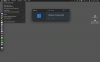
Hello!I use Parallels Desktop 17 on macOS Sonoma 14.1 on a MacBook Air M1.
When Parallels Desktop is open it displays a wrong app name in the app menu.
Instead of showing "Parallels Desktop" it shows "Apple".
Here is a screenshot:
View attachment 21555