Parallels 9, Win 7.0 and Mavericks

parallels_tb

Bit poster
Hi,

I am running Parallels 9 with Mavericks and Windows 7.0.

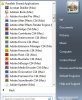
Problem: Cannot see all the Mac applications under Parallels, i.e. when i want to open a file under Windows (using Word for Mac or Open Office for example) I am given no details of the Mac installations. I had no problems under Parallels 6 with Win XP. Parallels 9/Win 7 just wont list all the Mac applications in the Parallels Shared Applications folder.

Can I add applications to the Parallels Shared Applications manually?
 
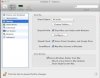
Yes you can with vm selected but not started Virtual Machine>Configure>Sharing

screen-capture-18.jpg customFolders.jpg Configure.jpg
 

Attachments

  • screen-capture-18.jpg
    screen-capture-18.jpg
    34.1 KB · Views: 20
  • customFolders.jpg
    customFolders.jpg
    32.5 KB · Views: 20
  • Configure.jpg
    Configure.jpg
    34.6 KB · Views: 20
Last edited:
Didn't work for me. I have Sharing on (for all disks), but Win 7 will still not list all Mac applications in the Shared Applications list
 
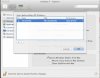
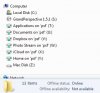
Try adding the folder you wish to share Virtual Machine>Configure>Sharing>Custom Folders> select the + sign> add folder
screen-capture-20.jpg
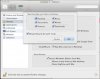
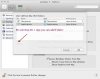
the added folders can be accessed on the win 7 side
screen-capture-22.jpg screen-capture-21.jpg
 

Attachments

  • screen-capture-20.jpg
    screen-capture-20.jpg
    52.3 KB · Views: 14
  • screen-capture-22.jpg
    screen-capture-22.jpg
    82.9 KB · Views: 14
  • screen-capture-21.jpg
    screen-capture-21.jpg
    33.9 KB · Views: 14
incomplete Shared Applications

Try adding the folder you wish to share Virtual Machine>Configure>Sharing>Custom Folders> select the + sign> add folder
View attachment 7767
the added folders can be accessed on the win 7 side
View attachment 7768 View attachment 7769


Many thanks. I tried that too, but there is no change. I wonder whether this might be a general issue with Parallels 9/Win 7 and OS Mav. I've asked people with Parallels 8 and it seems to be ok, and I am also using an older VM (originally created with Parallels 6) with Win XP - all Mac applications are visible in that version.
It list quite a few Mac applications, such as Facetime, but not the ones that I need, e.g. Word or Open Office.
 
Last edited:
Back
Top