JamesBailey
Bit poster
Since installing v9, there's a Windows logo that relates to the guest OS being run, even in Coherence mode. How do I get rid of that icon? It used to only show the open application icons, not the guest icon.

Follow along with the video below to see how to install our site as a web app on your home screen.
Note: This feature may not be available in some browsers.
I agree this is crazy annoying. I seem to remember this was an option in v8. Looks like 9 is getting a bit more 'my way or the highway' from parallels....
P.s.: I've found out that you can actually kill the helper app after entering coherence mode (search for it in Activity Monitor - it's named by your virtual machine - there will be duplicates (always 2 in my case) - force kill ONLY the one with lowest PID - it usually has a nice icon too) - the dock icon won't appear until you restart your virtual machine or parallels. My Win7 guest seems to be running rather* fine once the process is killed, but YMMV.
*) "rather" means that I have to display the start menu at least once before killing the helper app, otherwise it won't display without re-entering coherence at least a few times.
You are absolutely right that it's the Crystal Mode! I forgot about that. I can't imagine how can they can remove it and how it could be "not preferred by most of the users". Even if "most" users don't want it, then why remove? Can't they make an "Advanced options" section with features unwanted by some people but essential for others? For me Crystal Mode was the foundation of seamless integration. This is insane. I initially thought that they will "fix" the dock icon issue, but now it's clear that they wont! I am mad.
Maybe we should run a petition "Bring back Crystal Mode"? ;-)

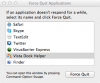
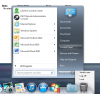
I agree. Please get rid of the dock icon and bring back crystal mode.Bring back crystal mode!!! You can tell by this thread that many us used this feature! The bouncing icon in my dock is freaking annoying.
