Parallels 9 ALWAYS shows Windows XP taskbar in Coherence Mode

Docger

Junior Member
Just installed the latest Parallels 9 upgrade.

Now, when in Coherence mode the Windows XP taskbar shows at the bottom of my screen.

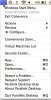
In the VIEW settings, SHOW WINDOWS TASKBAR is not checked, clicking it does nothing and there is no setting to HIDE WINDOWS TASKBAR.

This is an obvious failure with Parallels 9.

Please fix it.

BTW, so far I am underwhelmed with the mandatory to Parallels 9 to work with Mavericks. It is beastly slower (yes, I've done all the recommendations from the Parallels Knowledge Base to try to increase the speed) and now I'm finding bugs that weren't there with Parallels 7.

Not a happy camper.
 
Same problem for me after doing an update. It worked in an earlier version of Parallels 9, but with the latest update, I'm also having the same problem. I've completely removed and reinstalled it (including all files in the system and user libraries), but the problem persists. I also had a few hard crashes after the update where it crashed OSX when doing a VM restart, but that appears to be OK now (I hope...).

Definitely need to fix this.
 
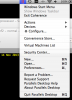
I began having the same issue with the windows XP task bar earlier today after a parallels update to build 9.0.23350. A Windows 7 VM has no problem but an XP one does. The option to toggle the task bar on/off is disabled (see image). I opened an official support case and I'm sure they must have received a ton so we'll see how long it takes them to fix it.

Screen Shot 2013-11-14 at 4.15.02 PM.png
 
Exact same problem here. I first tried re-installing Parallels Tools, to no avail. Then I tried uninstalling Parallels Tools and then installing them again. No dice. Anyone have any other ideas? Is there a keyboard shortcut to show and hide the Taskbar?
 
It's incredibly irritating installing an update and finding it introduces new defects.
I ended up configuring the windows taskbar to auto-hide. It still leaves a thin strip on the screen, but at least it's not visible the whole time.
I also have a second monitor, so I moved it off the primary screen. Far less annoying on the secondary monitor.
 
Excellent idea on the second monitor! I have two also, and I'll do exactly what you suggested. Nice workaround until an update with a fix is released.
 
Yes, I have exactly the same problem, starting from version 9.0.23350. My Windows XP virtual machine worked well in Coherence Mode before the update, but now the taskbar is always shown.
 
I confirm that I have the same issue.
When in Coherence mode the Windows XP taskbar shows at the bottom of my screen.
 
I've experienced precisely the same problem after upgrading Parallels Desktop 9. I'm running OS X 10.8.4; the client OS is Windows XP.
 
Am adding another unhappy person to this problem. Am running OS X 10.8.5 and using Windows XP. Hopefully, someone from Parallels reads these.
 
After having applied the latest update, which took me to version 9.0.23350, I am experiencing this unfortunate situation as well. Now the windows taskbar is always shown in Coherence Mode and there is not an option to turn it off. I definitely do not want the windows taskbar to show at all - not even auto-hide - I want it gone like it used to be. That is why I use Coherence Mode - so that Windows is not seen! Having the windows taskbar at the bottom is ugly and a nuisance.

2013-11-17_13-14-03.jpg
 
Same issue here, happened right after update. Boy do I regret updating now! That's the thing with Parallels their updates always manage to break something while they think they are "fixing" other issues. I don't know if I am going to be able to wait until they roll out a new update, I really wish Parallels would get their crap together and stop selling buggy products.
 
Add me to this annoying list. For what it's worth, I was working with another person who had the problem (I didn't yet), and i was on the latest version of Parallels Desktop, but the Parallels Tools hadn't installed yet on XP. After the reboot for installing Parallels Tools, I immediately had the problem. To me, this show that the problem lies with the new version of Parallels Tools.
 
Same issue here. Nothing I do seems to fix the problem. I notice no one from Parallels has responded to this thread. Will someone from Parallels at least acknowledge the problem?
 
Same issue here. Nothing I do seems to fix the problem. I notice no one from Parallels has responded to this thread. Will someone from Parallels at least acknowledge the problem?

I've been working with support on an open case but they've yet to acknowledge a bug of any sort. Their latest solution is for me to remove Parallels completely and reinstall. What kind of solution is that? I'm not sure why they wouldn't have caught this problem with a normal QA process or why they can't just recreate the problem on their end instead of having their customers try to jump through hoops.
 
Well, the problem has to be either Mavericks or Tools as there is no Coherence mode without installing Tools. So, the question becomes what has broken the option to hide the Windows taskbar? And why is the option unavailable from the Coherence extended menu but appears to be available (but non-functional) on the right-click dock icon menu? I move in and out of Coherence depending on the task I'm doing but another issue that I seem to be experiencing (which I think is related) is that the Windows application window extends behind the Dock and behind the File Menu Bar. I can resize the window easy enough but before the update the windows would stay confined to the natural boundaries of the desktop (between the Dock and FMB). Anyone else experiencing this, too?
 
Well, the problem has to be either Mavericks or Tools as there is no Coherence mode without installing Tools. So, the question becomes what has broken the option to hide the Windows taskbar? And why is the option unavailable from the Coherence extended menu but appears to be available (but non-functional) on the right-click dock icon menu? I move in and out of Coherence depending on the task I'm doing but another issue that I seem to be experiencing (which I think is related) is that the Windows application window extends behind the Dock and behind the File Menu Bar. I can resize the window easy enough but before the update the windows would stay confined to the natural boundaries of the desktop (between the Dock and FMB). Anyone else experiencing this, too?

I have the same problem, this is annoying and a continuous loss of time
 
Please add me to the list of annoyed users... Worse still, it's presence on the display makes the monitor flicker every now and then.
 
This will DEFINITELY be my last Parallels upgrade, buggy products + piss poor support = No thanks for my home business, we'll be seeking RELIABLE alternatives. I really hope Parallels can get their crap together for the companies sake. Good luck everyone!
 
Back
Top