Parallels 5 keeps restarting my dock

jhbarker

Bit poster
Whenever I open Parallels 5 or open one of my Windows VMs, I get this message:
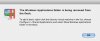
"The Windows Applications folder is being removed from the Dock. To add it back, right-click the Microsoft Windows XP virtual machine in the list, choose Configure > Shared Applications and select Show Windows applications folder in the Dock." and an "OK" button.

and the dock restarts. One very annoying aspect of this is that recent files and folders I have added to the dock disappear.

I add those files back to the dock, they are again removed once I open Parallels and get that message . . .

What is going on?
 
Hi,

Yes, we know about that problem and fixing it. Workarounds:
1. "Disable Show Windows applications folder in Dock" option (Configuration -> Options -> Shared Applications)
OR
2. Go inside Virtual Machine bundle (select Show Package Content in right-click menu in Finder), locate .hdd bundle and go inside it (select Show Package Content in right-click menu in Finder). Open DiskDescriptor.xml in TextEdit. Locate <GuestToolsVersion> section. Edit it to be <GuestToolsVersion>5.0.9220</GuestToolsVersion>
 
Last edited:
This is a really annoying behavior. It removes any non-app icons in the dock even though I've disabled the 'show windows application folder in dock' option for all my images. Is there any way to disable this feature all together?
 
Me too

Same problem with the added twist that I have turned off "show applications folder in dock" for any windows VMs but the ubuntu install (for which this feature does not appear to be supported and thus cannot be turned off) will restart the dock anyway.
 
Not quite

Hi,

Yes, we know about that problem and fixing it. Workarounds:
1. "Disable Show Windows applications folder in Dock" option (Configuration -> Options -> Shared Applications)
OR
2. Go inside Virtual Machine bundle (select Show Package Content in right-click menu in Finder), locate .hdd bundle and go inside it (select Show Package Content in right-click menu in Finder). Open DiskDescriptor.xml in TextEdit. Locate <GuestToolsVersion> section. Edit it to be <GuestToolsVersion>5.0.9220</GuestToolsVersion>


It's doing it for a Ubuntu virtual machine which already has 5.0.9220 as the GuestToolsVersion and shows "not available for this guest operating system" under Configuration -> Options -> Shared Applications.
 
Huh?

wonder_mice

Thanks for replying but:
1. I already have selected to Disable Show Windows applications folder in Dock for my windows VMs
2. xml file for both of my windows machines already says "<GuestToolsVersion>5.0.9220</GuestToolsVersion>"

I noticed another poster also has an ubuntu VM. I do, too. Is that causing trouble? (Of course, I realize it does not support showing its apps in the dock.)
 
Ubuntu it is

I've removed the Ubuntu VM from the VM list and the behaviour has stopped. I'm guessing the lack of support for a "Windows Applications folder" is somehow the cause of the problem.
 
Oh, that looks very weird, possibly this is another problem. Can you provide following information:
1. Screenshot of your Dock with many "Windows Applications" folders in it
2. Problem report. To make problem report, go to "Help -> Report a Problem" and post problem report number (id) here
3. File /Users/<You>/Library/Preferences/com.apple.dock.plist
(it is required for 2 and 3 to have "bug reproduced" and to have several "Windows Applications" folders in Dock, especially for Ubuntu guest)

Thanks.
 
removing Ubuntu . . .

removing Ubuntu from the VM list did not stop the problem for me. I still get the message about how the windows application folder is being removed, the dock restarts, and files and folders have disappeared from the dock. very annoying.
 
There never are multiple folder it just restarts the dock with this message every time, losing any shortcuts to files I had placed there for reference. Putting a copy of the dock plist back and restarting the dock clears it but that's not exactly convenient.

Screenshot of error window should be attached.
 

Attachments

  • Parallels.jpg
    Parallels.jpg
    32.8 KB · Views: 7
People, look, I know about the problem and I know that it is driving you all crazy. But I don't know why this happens with you. I want to help and to solve the problem, but without some information from you I can't do it. Please, send a problem report (as described earlier), post its number (id) here and attach your ~/Library/Preferences/com.apple.dock.plist file. There is something particular with your Mac's or Parallels configuration since we can't reproduce the issue in our labs.
 
Have patience please. Not everyone sits around all day with nothing to do but file bug reports. We have jobs too.

I've already sent you a private message asking how to post the requested info without posting it online. I can't just send you the report directly because I use this computer for work and I'm required to screen the information that goes out for anything that shouldn't go out. Please let me know how to get this to you now that it has been screened.
 
I have filed a report

I filed a report.

PID # 806283

Is there a way for me to sen you the dock plist directly, without posting it here?

thanks
jason
 
Still having this problem - Is there a solution?

It looks like this thread has been dormant for a while. I have the same problem described here, with the message window popping up every time I start and close Parallels. Is there a way to stop this behavior? Thank you.
 
Update

I submitted the info and files requested by the Parallels staff, and never heard back.

My hope is that it is addressed in the next (first?) Parallels 5 update.
 
No Fix...

I'm running version 5 and the same exact thing happens to me now with Windows 7 !!! Ughhh!!!!!
 
Back
Top