Hi
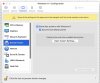
yesterday, I installed sonoma os and since then the "Show page setup options before printing" in the "Shared printers" section, disapearred.
Big problem for me as this is one of the most important features in our office.
Tried to restart, reinstall Parallels Tools, but nothing solved the problem
Could anyone help please ?
yesterday, I installed sonoma os and since then the "Show page setup options before printing" in the "Shared printers" section, disapearred.
Big problem for me as this is one of the most important features in our office.
Tried to restart, reinstall Parallels Tools, but nothing solved the problem
Could anyone help please ?