
Install the app
How to install the app on iOS
Follow along with the video below to see how to install our site as a web app on your home screen.
Note: This feature may not be available in some browsers.
You are using an out of date browser. It may not display this or other websites correctly.
You should upgrade or use an alternative browser.
You should upgrade or use an alternative browser.
Parallel Tools breaks my IE
- Thread starter Marcosi
- Start date
Alfena@Parallels
Pro
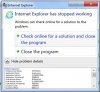
My Windows 7 is completely clean and the first I install is Parallels Tools. Parallels Tools then breaks Internet Explorer 11 with showing a box as attached.
I need windows 7 32 but in my work so I need a solution a.s.a.p.
Thanks,
Mats
Under the box this is the error>
Problem signature:
Problem Event Name: APPCRASH
Application Name: iexplore.exe
Application Version: 11.0.9600.18792
Application Timestamp: 59906b79
Fault Module Name: IEFRAME.dll
Fault Module Version: 11.0.9600.18793
Fault Module Timestamp: 5992fdd3
Exception Code: c00000fd
Exception Offset: 00011ac5
OS Version: 6.1.7601.2.1.0.256.48
Locale ID: 2057
Additional Information 1: d02e
Additional Information 2: d02eb704a2e4175a7ccf195983bc0a5d
Additional Information 3: 360d
Additional Information 4: 360dd5ebf00ce993dedec19006938bb6
Read our privacy statement online:
http://go.microsoft.com/fwlink/?linkid=104288&clcid=0x0409
If the online privacy statement is not available, please read our privacy statement offline:
C:\Windows\system32\en-US\erofflps.txt
Problem signature:
Problem Event Name: APPCRASH
Application Name: iexplore.exe
Application Version: 11.0.9600.18792
Application Timestamp: 59906b79
Fault Module Name: IEFRAME.dll
Fault Module Version: 11.0.9600.18793
Fault Module Timestamp: 5992fdd3
Exception Code: c00000fd
Exception Offset: 00011ac5
OS Version: 6.1.7601.2.1.0.256.48
Locale ID: 2057
Additional Information 1: d02e
Additional Information 2: d02eb704a2e4175a7ccf195983bc0a5d
Additional Information 3: 360d
Additional Information 4: 360dd5ebf00ce993dedec19006938bb6
Read our privacy statement online:
http://go.microsoft.com/fwlink/?linkid=104288&clcid=0x0409
If the online privacy statement is not available, please read our privacy statement offline:
C:\Windows\system32\en-US\erofflps.txt
Thanks,
Mats
Attachments
Arun@Parallels
Parallels Support

same here. the only thing that helps is to uninstall parallels tool. i do not have any third party plugins. i also tried msconfig und deselect all services non microsoft except parallels, same issue. i deselected parallels too, same issue. i uninstalled parallels tools, ie is working fine. same on version 12 and 13. windows is up to dat e btw.
I have Parallels Desktop 13 latest version. This was the solution for me:
- When Windows virtual machine is launched, enter Coherence view mode by going to View > Enter Coherence.
- Launch Internet Explorer > right click the panel on top of it > disable Show tabs on a separate row option.
- Exit Coherence and switch to your regular view mode.
Hello @Marcosi , please let us know if you are getting any error message when using Internet Explorer.
Thanks, Alfena
Actually it seems that latest version of Parallels Desktop breaks Internet Explorer in Windows 7, regardless MacOS version (using two computers one with Sierra and second with High Sierra) and Windows 7 version (32bit, 64bit, VM or boot camped). In each scenario You just cannot start Internet Explorer if Your Mac is connected via wireless. Once You connected to Ethernet everything works normal. It seems that driver in Parallels Tools works improperly.
It is definitely Parallels and not Microsoft problem.
I have Parallels Desktop 13 latest version. This was the solution for me:
http://kb.parallels.com/124290
- When Windows virtual machine is launched, enter Coherence view mode by going to View > Enter Coherence.
- Launch Internet Explorer > right click the panel on top of it > disable Show tabs on a separate row option.
- Exit Coherence and switch to your regular view mode.
Thanks -- this worked for me.
I'm on Parallels Desktop 12 and Internet Explorer was crashing when launching.
Searched the web and tried everything until entering Coherence mode.
However, when exiting Coherence view IE 11 crashed again so just left it in Coherence mode.
I can also confirm the error and the work around is to run in Coherence mode.
Parallels Desktop 13.1.0 (431108) running Windows 7 Home Premium Service Pack 1 - trying to launch IE 11.0.9600.18792
If I run Windows with the Parallels Tools installed by Parallels Desktop 13 - IE will not work. It will only run in Coherence mode.
If I run Windows with the Parallels Tools un-installed - IE will work.
This is not a Windows 7 OS issue - this a Parallels Tools software issue.
Parallels Desktop 13.1.0 (431108) running Windows 7 Home Premium Service Pack 1 - trying to launch IE 11.0.9600.18792
If I run Windows with the Parallels Tools installed by Parallels Desktop 13 - IE will not work. It will only run in Coherence mode.
If I run Windows with the Parallels Tools un-installed - IE will work.
This is not a Windows 7 OS issue - this a Parallels Tools software issue.
Doing some more testing ....
I can also confirm that if you turn WiFi off - and only run ethernet - it works - IE launches and runs.
Changing the Configuration of the VM - Network - Source - I change from Default Adapter to WiFi. Running the VM with this setting allowed IE to work.
Restarted several times and tested ethernet connected and WiFi off and ethernet off and WiFi connected.
I now have the Network - Source - set to Default Adapter and I cannot get IE to fail now. Not sure what has happened - but I cannot get IE to fail now.
Try playing with the Network - Source for your configuration as see if this resolves it. Leave a comment if it does.
I can also confirm that if you turn WiFi off - and only run ethernet - it works - IE launches and runs.
Changing the Configuration of the VM - Network - Source - I change from Default Adapter to WiFi. Running the VM with this setting allowed IE to work.
Restarted several times and tested ethernet connected and WiFi off and ethernet off and WiFi connected.
I now have the Network - Source - set to Default Adapter and I cannot get IE to fail now. Not sure what has happened - but I cannot get IE to fail now.
Try playing with the Network - Source for your configuration as see if this resolves it. Leave a comment if it does.
I also have a problem with Mac keyboard not working properly and after just paying for an upgrade I got this reply:
I am in the IT e-commerce business sine 10 years and Parallels support and customers service (that's why I use Parallels Desktop) is one of the worst I have experienced.
The product Parallels Desktop for Mac Pro Edition support is not covered by the Support contract you have.
Please check your Parallels account for available support options or purchase support.
Please check your Parallels account for available support options or purchase support.
I am in the IT e-commerce business sine 10 years and Parallels support and customers service (that's why I use Parallels Desktop) is one of the worst I have experienced.

Hi @DouglasH3, some of 3rd-party applications installed on your Virtual Machine causes this problem.Thanks -- this worked for me.
I'm on Parallels Desktop 12 and Internet Explorer was crashing when launching.
Searched the web and tried everything until entering Coherence mode.
However, when exiting Coherence view IE 11 crashed again so just left it in Coherence mode.
Please backup the .pvm file and, to fix the issue, please follow the steps mentioned in the article
1. Click on Start > type "msconfig" (without quotes) in the search field and press the Enter key.
2. In the General. tab > Select "Selective startup".
3. In 'Startup' and 'Services' Tabs tick 'Hide all Microsoft services' and Disable all non-Microsoft applications from the list, except Parallels.
4. Click 'Apply' and 'OK'
5. Restart the Windows and check the issue.