

Hi Everyone,
All of the sudden, when I open any message in a new window, using Outlook Classic, in Coherence mode, the new window that is supposed pop up remains hidden.
It's there.... If I hit Start+Tab, to show / switch between open windows, it's there (see attached screenshots). But the window only appears if I select the new message window.
This was working perfectly fine until a day or two ago.
So far I have re-installed Parallels Tools, and run disk utility on the Mac side to make sure all permissions were good.
I'm currently running...
Paralles Desktop 26 for Mac, Pro Edition, V 26.1.1 (57288)
MacBook Pro M3 Max, Tahoe 26.0.1
For reference, the 1st image is what my desktop looks like after hitting New Email, or opening an existing email in Outlook Classic, in Coherence Mode
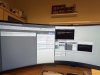
The 2nd image, is what I see when I hit Start + Tab to switch between open Window...
Thanks in advance for helping and suggestions.
Cheers,
J2T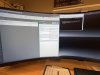
All of the sudden, when I open any message in a new window, using Outlook Classic, in Coherence mode, the new window that is supposed pop up remains hidden.
It's there.... If I hit Start+Tab, to show / switch between open windows, it's there (see attached screenshots). But the window only appears if I select the new message window.
This was working perfectly fine until a day or two ago.
So far I have re-installed Parallels Tools, and run disk utility on the Mac side to make sure all permissions were good.
I'm currently running...
Paralles Desktop 26 for Mac, Pro Edition, V 26.1.1 (57288)
MacBook Pro M3 Max, Tahoe 26.0.1
For reference, the 1st image is what my desktop looks like after hitting New Email, or opening an existing email in Outlook Classic, in Coherence Mode
The 2nd image, is what I see when I hit Start + Tab to switch between open Window...
Thanks in advance for helping and suggestions.
Cheers,
J2T
