Hi April,
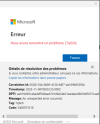
I'm seeing something very similar on a customer farm I work on (Windows Server 2022 RDSH, FSLogix profile container only, Microsoft 365 Apps). In my case the error tag is 58tm1 rather than 7q6ch, but the pattern is the same: intermittent sign-in failures in Outlook and Teams, users moving between session hosts, and until now the only fix was rebuilding the user's VHDX.
On an affected host, the Microsoft-Windows-AAD/Operational log shows hundreds of 0xCAA50080 errors (Session transport key is in bad state, raised in NgcHelper::ImportSymmetricPopKey), plus 0x80070003 errors in SignWithSymmetricPopKey. It also shows "The device is not joined to account's tenant": the session hosts are domain-joined only, not Microsoft Entra hybrid joined.
My working theory: the farm runs with FSLogix RoamIdentity set to 1, so the WAM/AAD token cache roams inside the VHDX. Those tokens are bound to the device that issued them, so when the user lands on another host they can't be used, and Office fails. Microsoft states that the Microsoft.AAD.BrokerPlugin, TokenBroker, OneAuth and IdentityCache folders must never leave the device, and FSLogix recommends RoamIdentity set to 0. A reader on BornCity reports exactly the trade-off I see: with RoamIdentity, 58tm1 comes back; without it, constant sign-in prompts.
Short term, instead of rebuilding the VHDX, I close Outlook, Teams and OneDrive and delete these folders in the user's LocalAppData: Packages\Microsoft.AAD.BrokerPlugin_cw5n1h2txyewy\AC\TokenBroker, Microsoft\TokenBroker, Microsoft\IdentityCache and Microsoft\OneAuth. The user then signs in to Office again.
Long term, I'm going to pilot Microsoft Entra hybrid join on the session hosts (targeted deployment with a client-side SCP), then set RoamIdentity to 0. Each logon then gets a PRT valid for the current host, so tokens no longer need to roam. I'm also moving FSLogix to the latest release (26.08), but updating FSLogix alone didn't fix it here.
To check whether your case is the same, could you share your RoamIdentity value (HKLM\SOFTWARE\FSLogix\Profiles), the output of dsregcmd /status on a session host (AzureAdJoined and DomainJoined), the AAD Operational log errors around the time of the error, and whether you use Shared Computer Activation, with your Office version and channel? 7q6ch is also reported around activation.
Useful references:
Learn how to manage Microsoft Entra device identities in virtual desktop infrastructure (VDI) environments to prevent stale devices and tenant quota consumption.
learn.microsoft.com
Provides the various configuration settings and descriptions used in FSLogix
learn.microsoft.com
[German]There has been an update to FSLogix version 25.09. Feedback from readers suggests that this fixes the error [58tm1] that frequently occurs in Outlook 365. In addition, the OneDrive bug in…

borncity.com
I'll post an update once the hybrid join pilot is done.
Thierry
En français si tu préfères ;-)
Bonjour April,
Je rencontre quelque chose de très proche sur une ferme client dont je m'occupe (RDSH Windows Server 2022, conteneur de profil FSLogix seul, Microsoft 365 Apps). Chez moi le code est 58tm1 et non 7q6ch, mais le schéma est le même : échecs de connexion intermittents dans Outlook et Teams, des utilisateurs qui passent d'un hôte de session à l'autre, et jusqu'ici la seule réparation était de reconstruire le VHDX de l'utilisateur.
Sur un hôte touché, le journal Microsoft-Windows-AAD/Operational contient des centaines d'erreurs 0xCAA50080 (Session transport key is in bad state, levées dans NgcHelper::ImportSymmetricPopKey), plus des erreurs 0x80070003 dans SignWithSymmetricPopKey. On y trouve aussi « The device is not joined to account's tenant » : les hôtes sont seulement joints au domaine, pas en jonction hybride Microsoft Entra.
Mon hypothèse : la ferme tourne avec RoamIdentity à 1 dans FSLogix, donc le cache de jetons WAM/AAD voyage dans le VHDX. Ces jetons sont liés à l'appareil qui les a émis : quand l'utilisateur arrive sur un autre hôte, ils sont inutilisables et Office échoue. Microsoft indique que les dossiers Microsoft.AAD.BrokerPlugin, TokenBroker, OneAuth et IdentityCache ne doivent jamais quitter l'appareil, et FSLogix recommande RoamIdentity à 0. Un lecteur de BornCity décrit exactement l'arbitrage que je constate : avec RoamIdentity, 58tm1 revient ; sans, les demandes de connexion se répètent.
À court terme, au lieu de reconstruire le VHDX, je ferme Outlook, Teams et OneDrive, puis je supprime ces dossiers dans le LocalAppData de l'utilisateur : Packages\Microsoft.AAD.BrokerPlugin_cw5n1h2txyewy\AC\TokenBroker, Microsoft\TokenBroker, Microsoft\IdentityCache et Microsoft\OneAuth. L'utilisateur se reconnecte ensuite à Office.
Sur le fond, je vais piloter la jonction hybride Microsoft Entra sur les hôtes de session (déploiement ciblé, avec le SCP poussé en registre), puis passer RoamIdentity à 0. Chaque ouverture de session obtient alors un PRT valable sur l'hôte en cours, et les jetons n'ont plus besoin de voyager. Je passe aussi FSLogix à la dernière version (26.08), mais ici, la mise à jour de FSLogix seule n'a pas réglé le problème.
Pour savoir si ton cas est le même, peux-tu partager ta valeur de RoamIdentity (HKLM\SOFTWARE\FSLogix\Profiles), le résultat de dsregcmd /status sur un hôte de session (AzureAdJoined et DomainJoined), les erreurs du journal AAD Operational au moment de l'erreur, et me dire si tu utilises l'activation des ordinateurs partagés, avec ta version et ton canal d'Office ? 7q6ch est aussi signalé autour de l'activation.
Je posterai un retour une fois le pilote de jonction hybride terminé.
Thierry
P.S.: Tu peux m'envoyer les informations en privé si tu le souhaites.