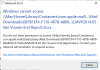
I did not have this issue with Majove. It appeared when I installed Catalina. I use Parallels 14, Windows 10, and Catalina, in an iMac. From the mail app, if there is a word file enclosed to a mail message, when I double click on the word file in the nail message, Word (installed on Windows 10) used to open the word file. But now, on Catalina, I receive the error in the enclosed screen shot. I reinstalled Parallels Tools and it did not help. I can open word files located on my Mac desktop using with Word installed on my Windows 10 without problems. Why is this happening and how can I solve the problem?

Opening doc file from the mail app in Catalina
- Thread starter TungaK
- Start date
-
- Tags
- catalina mail microsoft office