Hi there!
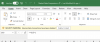
I'm using Parallels in coherence mode as the default option for opening .xlsx files. I've noticed an issue that when I open up .xlsx files from my OneDrive on Mac, they don't open up in a OneDrive synced mode, but rather in the "Saved to this PC" mode. It looks like it's opening files from \\Mac\OneDrive-(MyName)
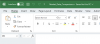
This is however not what I want. I want the files to open in the mode where I can collaborate with coworkers and do live edits.
If I actually browse to OneDrive in Parallels Windows and open up the same file, it actually opens up in the correct mode:
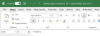
Notice how AutoSave is on and there's the collaboration icon after the file name.
Is there any way to make the files open up in this synced mode straight from opening them to Parallels Excel from my Mac?
I'm using Parallels in coherence mode as the default option for opening .xlsx files. I've noticed an issue that when I open up .xlsx files from my OneDrive on Mac, they don't open up in a OneDrive synced mode, but rather in the "Saved to this PC" mode. It looks like it's opening files from \\Mac\OneDrive-(MyName)
This is however not what I want. I want the files to open in the mode where I can collaborate with coworkers and do live edits.
If I actually browse to OneDrive in Parallels Windows and open up the same file, it actually opens up in the correct mode:
Notice how AutoSave is on and there's the collaboration icon after the file name.
Is there any way to make the files open up in this synced mode straight from opening them to Parallels Excel from my Mac?