
Hi team,
After updating my host Mac from macOS 15.4 to 15.5, I can no longer sign in to Xcode with my Apple ID, iCloud, or the App Store in any virtual macOS instance. I've tried using virtual machines with macOS 15.4, 15.5, and 14.7.6, but even my previously working VMs have stopped functioning.
I believe this issue is related to the host macOS version.
All sign-in attempts result in the error: "An unknown error occurred."

The Console shows some errors related to the AppleAuthKit package.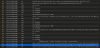
Specially,
Attestation error Error Domain=com.apple.devicecheck.error.baa Code=-10001 UserInfo={NSUnderlyingError=0x5a086e9a0 {Error Domain=com.apple.MobileActivation.ErrorDomain Code=-1 UserInfo={NSLocalizedDescription=<private>, NSUnderlyingError=0x5a086cf00 {Error Domain=com.apple.MobileActivation.ErrorDomain Code=-1 UserInfo={NSLocalizedDescription=<private>}}}}}
Has anyone else encountered this problem?
Any ideas on how to fix it?
After updating my host Mac from macOS 15.4 to 15.5, I can no longer sign in to Xcode with my Apple ID, iCloud, or the App Store in any virtual macOS instance. I've tried using virtual machines with macOS 15.4, 15.5, and 14.7.6, but even my previously working VMs have stopped functioning.
I believe this issue is related to the host macOS version.
All sign-in attempts result in the error: "An unknown error occurred."
The Console shows some errors related to the AppleAuthKit package.
Specially,
Attestation error Error Domain=com.apple.devicecheck.error.baa Code=-10001 UserInfo={NSUnderlyingError=0x5a086e9a0 {Error Domain=com.apple.MobileActivation.ErrorDomain Code=-1 UserInfo={NSLocalizedDescription=<private>, NSUnderlyingError=0x5a086cf00 {Error Domain=com.apple.MobileActivation.ErrorDomain Code=-1 UserInfo={NSLocalizedDescription=<private>}}}}}
Has anyone else encountered this problem?
Any ideas on how to fix it?