I'm running Parallels Desktop 13for Mac.
Frequently I run a Windows app that creates data in a Windows folder, and I want a Mac app to read that data.
How might I do this?
I've tried to make a Mac alias (command-L) to the folder, but the Finder complains:
The operation can't be completed because you don't have the necessary permission.
How do I fix this?
Or is there another method to get the Mac programs to find the file?
I have yet to make either of these methods work for me:
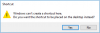
(a) Make a Mac alias to a Windows folder.
(b) Make a Windows link to a Mac folder.
Frequently I run a Windows app that creates data in a Windows folder, and I want a Mac app to read that data.
How might I do this?
I've tried to make a Mac alias (command-L) to the folder, but the Finder complains:
The operation can't be completed because you don't have the necessary permission.
How do I fix this?
Or is there another method to get the Mac programs to find the file?
I have yet to make either of these methods work for me:
(a) Make a Mac alias to a Windows folder.
(b) Make a Windows link to a Mac folder.