
Install the app
How to install the app on iOS
Follow along with the video below to see how to install our site as a web app on your home screen.
Note: This feature may not be available in some browsers.
You are using an out of date browser. It may not display this or other websites correctly.
You should upgrade or use an alternative browser.
You should upgrade or use an alternative browser.
no boot device
- Thread starter max_y
- Start date

Ynot
Pro
1. You can try press Reset button on Parallels toolbar when you see that message. Suggestion: disk is not spinned up when guest BIOS tried to access it, so it can't "see" disk. Do not press "Enter", press "Reset" on toolbar!!
2. You can try make ISO image with Mac disk image utility. If it competed without errors Parallels should boot from it, if in same configuration it boots from other (Knoppix for example) ISO image.
2. You can try make ISO image with Mac disk image utility. If it competed without errors Parallels should boot from it, if in same configuration it boots from other (Knoppix for example) ISO image.
problem solved...
I actually solved the problem with another WinXP build. I got a nother WinXP SP1 CD from our department and everything worked out fine. I had the same loop problem as you magrit, but I solved it this way:
1.)Installed XP with CD-ROM boot device first (ne VM with default settings, except boot order).
2.)At the end of the installation the software tells you that it will reboot in 15 second. During this 15 seconds, you have to right click the small CD icon in the right corner of the parallels window and choose disconnect. press Enter.
I tried to stop VM, change boot sequence to hdd first but this did not work. However, it worked like
I described above. You may wanna try this out and report back to the forum if this only worked for me or if this suggestion solved your problem, too.
Summarizing:
1) Change from WinXP SP2 to a BOOTABLE WinXP SP1 works. Frankly, I am not that sure that the other one a bootable CD
2.)Endless loop of install stopped by manually disconnecting CD-ROM before restart of the installation.
Hope to have helped margrite and any other.
And I want to thank everyone for the lively discussion, hope you all solve the problem.
magrite said:Did everyone figure it out or give up? I could REALLY use some help. What I've figured out with my first step in windows installation that lead to an endless restart of the installation process is that there is something still wrong with the boot sector. I can't get to the next step in installing XP because it won't boot from the harddisk once the first installation step is complete. When it boots from the cd image, it starts in the same place: step one in the installation process.
I actually solved the problem with another WinXP build. I got a nother WinXP SP1 CD from our department and everything worked out fine. I had the same loop problem as you magrit, but I solved it this way:
1.)Installed XP with CD-ROM boot device first (ne VM with default settings, except boot order).
2.)At the end of the installation the software tells you that it will reboot in 15 second. During this 15 seconds, you have to right click the small CD icon in the right corner of the parallels window and choose disconnect. press Enter.
I tried to stop VM, change boot sequence to hdd first but this did not work. However, it worked like
I described above. You may wanna try this out and report back to the forum if this only worked for me or if this suggestion solved your problem, too.
Summarizing:
1) Change from WinXP SP2 to a BOOTABLE WinXP SP1 works. Frankly, I am not that sure that the other one a bootable CD
2.)Endless loop of install stopped by manually disconnecting CD-ROM before restart of the installation.
Hope to have helped margrite and any other.
And I want to thank everyone for the lively discussion, hope you all solve the problem.
patzari said:I actually solved the problem with another WinXP build. I got a nother WinXP SP1 CD from our department and everything worked out fine. I had the same loop problem as you magrit, but I solved it this way:
1.)Installed XP with CD-ROM boot device first (ne VM with default settings, except boot order).
2.)At the end of the installation the software tells you that it will reboot in 15 second. During this 15 seconds, you have to right click the small CD icon in the right corner of the parallels window and choose disconnect. press Enter.
I tried to stop VM, change boot sequence to hdd first but this did not work. However, it worked like
I described above.
Quick question: are you partitioning to NTFS or
FAT?
magrite said:
Quick question: are you partitioning to NTFS or
FAT?
NTFS, I use the default choice of WinXP during the installation.
Many thanks to Patzari -- I got it to work. Unfortunately, I'm not exactly sure how because after a week of this I decided to do a "hail" Mary and changed a couple of variables at the same time.patzari said:I actually solved the problem with another WinXP build. I got a nother WinXP SP1 CD from our department and everything worked out fine. I had the same loop problem as you magrit, but I solved it this way:
1.)Installed XP with CD-ROM boot device first (ne VM with default settings, except boot order).
2.)At the end of the installation the software tells you that it will reboot in 15 second. During this 15 seconds, you have to right click the small CD icon in the right corner of the parallels window and choose disconnect. press Enter.
I tried to stop VM, change boot sequence to hdd first but this did not work. However, it worked like
I described above. You may wanna try this out and report back to the forum if this only worked for me or if this suggestion solved your problem, too.
Summarizing:
1) Change from WinXP SP2 to a BOOTABLE WinXP SP1 works. Frankly, I am not that sure that the other one a bootable CD
2.)Endless loop of install stopped by manually disconnecting CD-ROM before restart of the installation.
Hope to have helped margrite and any other.
And I want to thank everyone for the lively discussion, hope you all solve the problem.
OVERVIEW:
I upgraded Parallels to build 1898 Release candidate.
I used an .iso of Windows XP SP2 made on a computer other than my new Macbook Pro.
I made a new VM, using all the defaults except for the boot order (per Patzari's advice)
I went through the Windows installation and used FAT32 (I had been using NTSF, both quick and normal before -- don't know if this change was why it worked or if I could have continued using NTSF).
I pushed "enter" after disconnecting the cd image (I had been disconnecting the image and letting the system reboot automatically -- patzari suggested this change).
I believe there are several very good step by step instructions on how to make an .iso of windows xp that you can find through a search engine. One keyword is "slipstream," since pc people seem to want to do this not to face the 58 upgrades that you get the first time you shut down windows after installation.kenduit said:Hi,
Thanks ! I would like to try the fix but could use step by step instructions with a screen shot on how to do it.Such as how to make iso of windows xp sp2 on a dell computer?The more details the better.
Thanks Ken
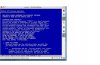
I presume you're using a MacBook or MacBook Pro. On a notebook, by default, the function keys perform local actions (e.g., changing screen brightness, volume, keyboard backlighting). To use a function key as a function key in a program, you must press and hold the "fn" key (lower left corner) and then press the function key. So, to type F8, you need to type fn and F8.
You can disable this behavior in the System Preferences.
You can disable this behavior in the System Preferences.
Some progress ...More error messages
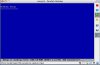
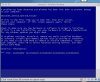
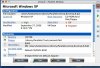
started set up then error message Ist pic shows loading then next message comes on for a few seconds took several times to capture it the switckes to last pic and vm power shuts down Please Advise Thanks Ken
started set up then error message Ist pic shows loading then next message comes on for a few seconds took several times to capture it the switckes to last pic and vm power shuts down Please Advise Thanks Ken
Attachments
sangre said:what is mac ?
mac doesn't mean anything.
Mac is short for Macintosh.
MAC is Media Access Control.
Confusing isn't it? Have you learned anything useful from this?
Wow, I just got my MacBook 2 days ago and have had trouble installing Parallels too! I even reinsalled OSX like you did to no avail. And like you I am so behind in my work that I might need to get rid of my Mac too. I am so frustrated. How many of us can have "corrrupted files" and "no booting device"? Does Parallels ever call or email anyone back???