No auto presentation mode

Juan9

Bit poster
I use a macbook and I keep moving from my desk to other places in the office. I do not want to have presentation mode by defect when I connect the HDMI port in my desk to work with a second screen. How can I cancel the auto presentation HDMI detection? Thanks
 
Hello,

you have two options:
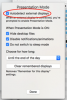
1) Uncheck 'Autodetect external displays' option in Presentation Mode preferences. Open Toolbox -> right click on 'Presentation Mode' -> Preferences...
In this case Presentation Mode will not detect external displays connecting. You will start and stop Presentation Mode manually.
pict1.png
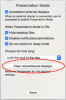
2) Clear list of remembered displays in Presentation Mode preferences. Open Toolbox -> right click on 'Presentation Mode' -> Preferences... -> click on 'Clear remembered displays'.
pict2.png
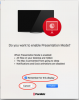
In this case after connecting every external display you will be prompted to enable Presentation Mode. Press 'Cancel' on appropriate dialog and set 'Remember checkbox':
pict3.png
 
Back
Top