No audio in recording of ZOOM meeting

Hi,
I choose Parallels Loopback from Audio devices after launching Screen capture when in a ZOOM meeting, but after finishing, no sound on the screen recording. It's rather annoying I just had a fantastic meeting with superb info and realise that there is no sound on the recording. I use the latest version from everything (Sonoma 14.2.1 and Parallels Toolbox 6.6.1) Thanks!
 
Hi,
I choose Parallels Loopback from Audio devices after launching Screen capture when in a ZOOM meeting, but after finishing, no sound on the screen recording. It's rather annoying I just had a fantastic meeting with superb info and realise that there is no sound on the recording. I use the latest version from everything (Sonoma 14.2.1 and Parallels Toolbox 6.6.1) Thanks!
Hello,
For us to further investigate this issue, kindly reproduce the issue and collect a technical report with the help of this article and provide us with the report's 9-digit ID in reply to this post.
Thank you.
 
Hi there, I'm experiencing the same issue with the audio recording in Zoom meetings. I've selected Parallels Loopback as the audio device in Screen capture, but unfortunately, there is no sound in the recorded file after finishing the meeting. I'm also using the latest versions of Sonoma (14.2.1) and Parallels Toolbox (6.6.1). It's frustrating to miss out on important information after having a great meeting. If anyone has found a solution or has any suggestions, I'd greatly appreciate the help!

Hello Joe,

Kindly perform the following actions:

1. Click on the Toolbox icon.
2. Hover over Record Screen and select the Gear(settings) icon.
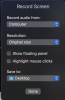
3. Select the "Record audio from" dropdown and choose "Computer + Default Microphone".
4. Attempt to reproduce the issue.

Kindly let us know if this resolves the issue.
 
That's not the issue, of course the sound will be recorded with the microphone, so will any external noise from the other room, from the street, etc.... The issue is that it's not recording computer sound, even when Parallels Loobpack device is selected. I downloaded BlackHole sound device, and choose that, but even then there is no sound in the recorded video.
In the meantime there is sound using default computer sound when using OBS Studio to record the screen.
By the way, I believe this started with Sonoma, before that I did not have this problem.
Thanks for investigating!
 
That's not the issue, of course the sound will be recorded with the microphone, so will any external noise from the other room, from the street, etc.... The issue is that it's not recording computer sound, even when Parallels Loobpack device is selected. I downloaded BlackHole sound device, and choose that, but even then there is no sound in the recorded video.
In the meantime there is sound using default computer sound when using OBS Studio to record the screen.
By the way, I believe this started with Sonoma, before that I did not have this problem.
Thanks for investigating!

Hello,

Thank you for your response.
Kindly perform the following actions:

1. Click on the Toolbox icon.
2. Hover over the Record Screen tool and select the Gear(settings) icon.
3. Select the "Record audio from" dropdown
4. Take a screenshot and send it in reply to this post.

We look forward to hearing from you soon.
 
Hi,
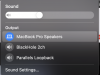
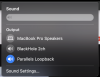
Here it is. I also attach screenshots while recording a full-screen zoom meeting, still no sound.
 

Attachments

  • Screenshot 2024-02-19 at 19.48.54.png
    Screenshot 2024-02-19 at 19.48.54.png
    131.3 KB · Views: 6
  • Screenshot 2024-02-19 at 19.53.48.png
    Screenshot 2024-02-19 at 19.53.48.png
    89.7 KB · Views: 7
  • Screenshot 2024-02-19 at 19.53.38.png
    Screenshot 2024-02-19 at 19.53.38.png
    89.8 KB · Views: 6
Hi,
I choose Parallels Loopback from Audio devices after launching Screen capture when in a ZOOM meeting, but after finishing, no sound on the screen recording. It's rather annoying I just had a fantastic meeting with superb info and realise that there is no sound on the recording. I use the latest version from everything (Sonoma 14.2.1 and Parallels Toolbox 6.6.1) Thanks!

were you able to resolve it?
 
Hello all,

Please be informed that our Development Team is looking into this issue, as soon as we have an update, we will provide one.
 
Hi there, I'm experiencing the same issue with the audio recording in Zoom meetings. I've selected Parallels Loopback as the audio device in Screen capture, but unfortunately, there is no sound in the recorded file after finishing the meeting. I'm also using the latest versions of Sonoma (14.2.1) and Parallels Toolbox (6.6.1). It's frustrating to miss out on important information after having a great meeting. If anyone has found a solution or has any suggestions, I'd greatly appreciate the help!
I am also facing same issue while recording audio in zoom
 
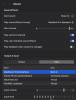
I tried with Parallels Tools (Version 6.6.2 (5023)) and still have the same issue. However it is strange, because it did not record sound even when I see to MacBook Microphone (see attached image).
 

Attachments

  • Screenshot 2024-04-19 at 20.07.04.png
    Screenshot 2024-04-19 at 20.07.04.png
    266.2 KB · Views: 4
My mistake, in the initial setup Microphone was not turned on. In any case, I tried all options in the options before starting the screen recording and during recording changing the sound device... no success unfortunately.
 
I'm facing an issue with Parallels Toolbox on macOS Sonoma (14.2.1) where Zoom meetings aren't recording audio, even when "Parallels Loopback" is selected as the input device. I also tried using the BlackHole virtual driver, but still no sound in the recorded file. Oddly, OBS Studio captures audio without issues using the default system settings. Has anyone else experienced this or found a fix?
 
I'm facing an issue with Parallels Toolbox on macOS Sonoma (14.2.1) where Zoom meetings aren't recording audio, even when "Parallels Loopback" is selected as the input device. I also tried using the BlackHole virtual driver, but still no sound in the recorded file. Oddly, OBS Studio captures audio without issues using the default system settings. Has anyone else experienced this or found a fix?

Hello BestP6,

Please be informed that our Development Team are aware of this issue and working on a fix.

Thank you for your understanding.
 
Hi there, I'm experiencing the same issue with the audio recording in Zoom meetings. I've selected Parallels Loopback as the audio device in Screen capture, but unfortunately, there is no sound in the recorded file after finishing the meeting. I'm also using the latest versions of Sonoma (14.2.1) and Parallels Toolbox (6.6.1). It's frustrating to miss out on important information after having a great meeting. If anyone has found a solution or has any suggestions, I'd greatly appreciate the help!
any solution of this problem. i am also facing this issue.
 
Hello,
  1. For us to further investigate this issue, kindly reproduce the issue and collect a technical report with the help of this article and provide us with the report's 9-digit ID in reply to this post.
Thank you.
I would like to add that I am also facing the same issue. After selecting Parallels Loopback from Audio devices and recording during a Zoom meeting, there is no sound in the final screen recording. I'm using the latest versions of Sonoma (14.2.1) and Parallels Toolbox (6.6.1). Please advise on how to resolve this, and I can also provide a technical report if needed.
 
Also having this issue, Sequoia 15.5, MacBook Pro M1. It is unable to record computer audio, only the microphone. Don't think there's ever been a point in time throughout the years where I've had a license and this feature worked as intended. Different Macbooks, different versions, different license versions, same issue.
 
Hi, is there any update on this persistent issue?

I am experiencing the same issue. I am unable to record any screen recording with sound, especially from Zoom meetings. Please help.

Hello BestP6,

Please be informed that our Development Team are aware of this issue and working on a fix.

Thank you for your understanding.
 
Back
Top