Need help understanding what Clean Drive files it is looking at

RJ-1125

Bit poster
Hi all. I don't want to ask a redundant question, so please let me explain. My Clean Drive tells me that I have 15GB of data that I can clean off my Mac from a variety of locations.

My quest for knowledge is:
1) how do I know if these files are important?
2) where is Clean Drive looking and using to determine that these files are no longer needed?

Is there a listing of folder locations or criteria that can be shared so that I can understand the impact and don't inadvertently remove a folder that is important to me? I've been successful at erasing critical history of my son and his cousins previously and don't want to make that error again and lose out on great embarrassing evidence for when they start their own families. Any guidance or clarification would be greatly appreciated. Thank you.
 
I have the same question(s) as Rj-1125. I've got 20.17GB identified. No idea what the individual files are. Can't find "Clean Drive" in the Parallels Desktop Users Guide, and a search of the KB's didn't produce anything useful (that I could find in a quick look at the results). Is there a place to look that I've been unable to find. Maybe this response will bump the question up and get an answer.

Thanks, Terry
 
Guys, thank you very much for the feedback. We will improve Clean Drive usability in future updates.
I really appreciate your response, Dimitry, and you have a good idea there. For right now, is there anywhere that I (and perhaps RJ-1225) can see what files are targeted for deletion by using Clean Drive? I would love to free up 20gb of drive space, but I first need to know what's going to happen -- perhaps only a high level description of what's happening would do for now. Please?

Thanks, Terry
 
@RJ-1125, @Terry2, here are directories that Clean Drive tool empties:

Log files - Activity logs created by your applications
~/Library/Logs/
~/Library/Containers/<...>/Data/Library/Logs

Cache files - Temporary files created by your applications
~/Library/Caches/
~/Library/Containers/<...>/Data/Library/Caches

Trash - Files that are already in the Trash bin
~/.Trash
~/Library/Mobile Documents/com~apple~CloudDocs/.Trash/
/Volumes/<...>/.Trashes

Browser data - Browser cache, history and cookies
~/Library/Caches/Metadata/Safari/History
~/Library/Safari/History.db
~/Library/Safari/WebpageIcons.db
~/Library/Safari/LocalStorage

~/Library/Caches/Google/Chrome/Default
~/Library/Application Support/Google/Chrome/Default/History
~/Library/Application Support/Google/Chrome/Default/Cookies

~/Library/Application Support/com.operasoftware.Opera/Local Storage

~/Library/Application Support/Firefox/Profiles/<...>/storage/default
~/Library/Application Support/Firefox/Profiles/<...>/storage/temporary

Mail cache - Mail temporary files and attachments
~/Library/Containers/com.apple.mail/Data/Library/Mail Downloads/
~/Library/Mail Downloads/

Mobile apps - Mobile applications from your iTunes library
~/Music/iTunes/iTunes Media/Mobile Applications/

iTunes temp files - Temporary iTunes files
~/Music/iTunes/Album Artwork/Cache/
~/Music/iTunes/Previous iTunes Libraries

iOS device backups - Backups of your iOS devices
~/Library/Application Support/MobileSync/Backup

Old updates - Old update files
~/Library/iTunes/iPhone Software Updates
~/Library/iTunes/iPod Software Updates
~/Library/iTunes/iPad Software Update
 
Terry2, thanks for amplifying and keeping up the dialogue. Dimitry, thanks for providing clarity. It is extremely helpful; biggest fear is that I delete something important and can't get it back. I kind of gave up on the thread as there was no movement for over a month. Thanks again for following up.
 
@RJ-1125, @Terry2, here are directories that Clean Drive tool empties:

Log files - Activity logs created by your applications
~/Library/Logs/
~/Library/Containers/<...>/Data/Library/Logs

Cache files - Temporary files created by your applications
~/Library/Caches/
~/Library/Containers/<...>/Data/Library/Caches

Trash - Files that are already in the Trash bin
~/.Trash
~/Library/Mobile Documents/com~apple~CloudDocs/.Trash/
/Volumes/<...>/.Trashes

Browser data - Browser cache, history and cookies
~/Library/Caches/Metadata/Safari/History
~/Library/Safari/History.db
~/Library/Safari/WebpageIcons.db
~/Library/Safari/LocalStorage

~/Library/Caches/Google/Chrome/Default
~/Library/Application Support/Google/Chrome/Default/History
~/Library/Application Support/Google/Chrome/Default/Cookies

~/Library/Application Support/com.operasoftware.Opera/Local Storage

~/Library/Application Support/Firefox/Profiles/<...>/storage/default
~/Library/Application Support/Firefox/Profiles/<...>/storage/temporary

Mail cache - Mail temporary files and attachments
~/Library/Containers/com.apple.mail/Data/Library/Mail Downloads/
~/Library/Mail Downloads/

Mobile apps - Mobile applications from your iTunes library
~/Music/iTunes/iTunes Media/Mobile Applications/

iTunes temp files - Temporary iTunes files
~/Music/iTunes/Album Artwork/Cache/
~/Music/iTunes/Previous iTunes Libraries

iOS device backups - Backups of your iOS devices
~/Library/Application Support/MobileSync/Backup

Old updates - Old update files
~/Library/iTunes/iPhone Software Updates
~/Library/iTunes/iPod Software Updates
~/Library/iTunes/iPad Software Update

This is excellent - even if you only add this list as a text selectable dialog box in the interface that would be very helpful. Maybe add a tiny "?" next to the Gear icon that's already in the upper right corner of the CleanUp UI. Minimal UI clutter, but adds useful info for those who need it.

Thanks for the question and response!
 
Hi,
we're going to improve Clean Drive and add additional information about files/folders to be deleted.

Thanks for your feedbacks.
 
I just used Clean Drive and it tells me there are 39 GB old updates. Previously I used CleanMyMac and this was never told. Is it safe to delete this? Is it only scanning the boot disk?
 
Hello,
I just used Clean Drive and it tells me there are 39 GB old updates. Previously I used CleanMyMac and this was never told. Is it safe to delete this? Is it only scanning the boot disk?

you can find information about what Clean Drive actually cleans in our Knowledge Base: https://kb.parallels.com/en/124591


Regarding your questions,

Is it only scanning the boot disk?
yes, Clean Drive scans only boot disk

Is it safe to delete this?
yes if you don't need for old updates data anymore
 
I really appreciate your response, Dimitry, and you have a good idea there. For right now, is there anywhere that I (and perhaps RJ-1225) can see what files are targeted for deletion by using Clean Drive? I would love to free up 20gb of drive space, but I first need to know what's going to happen -- perhaps only a high level description of what's happening would do for now. Please?

Thanks, Terry
I have the same question(s) as Rj-1125. I've got 20.17GB identified. No idea what the individual files are. Can't find "Clean Drive" in the Parallels Desktop Users Guide, and a search of the KB's didn't produce anything useful (that I could find in a quick look at the results). Is there a place to look that I've been unable to find. Maybe this response will bump the question up and get an answer.
 
Hi all,
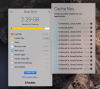
We have just released 3.5 update for Toolbox, and it will provide more information about files that Clean Drive locates
Screen Shot 2019-07-23 at 11.02.27 AM.png
 
I have the same question(s) as Rj-1125. I've got 20.17GB identified. No idea what the individual files are. Can't find "Clean Drive" in the Parallels Desktop Users Guide, and audacity find my iphone origin a search of the KB's didn't produce anything useful (that I could find in a quick look at the results). Is there a place to look that I've been unable to find. Maybe this response will bump the question up and get an answer.
I really appreciate your response, Dimitry, and you have a good idea there. For right now, is there anywhere that I (and perhaps RJ-1225) can see what files are targeted for deletion by using Clean Drive? I would love to free up 20gb of drive space, but I first need to know what's going to happen -- perhaps only a high level description of what's happening would do for now. Please?
 
ZIMZ,
in our latest release we've improved Clean Drive tool and added possibility to look what folders will be cleared - please look at Alex Patsay's post (two posts above this).

Is it what you're expected?
 
Thanks for the update to Clean Drive. I've always been wary of just letting an app delete 40gb of files.
One thing of note for AERIAL SCREEN SAVER users. The screen saver files (videos) are stored in \library\caches... So if you run Clean Drive it will wipe all those saved videos. (requiring you to have to download them again, filling the cache, and next month Clean Drive will delete them again). :O

To the Devs: one additional feature that would be nice, is the ability to "uncheck" one of the suggested folders under Caches. I like the fly out window, but it doesn't let us make any selections, its all or none.
thanks
s
 
Hello,

To the Devs: one additional feature that would be nice, is the ability to "uncheck" one of the suggested folders under Caches. I like the fly out window, but it doesn't let us make any selections, its all or none.
We have a plan to add the ability to choose which folder in each category will be cleaned. I hope this functionality will appear soon.

Thanks for you feedback.
 
Back
Top