Mouse Cursor is HUGE

khaosspawn

Bit poster
Hi There,
I upgraded my parallels 16 to 17 and now the cursor in windows is huge! I've reinstalled parallels tools - restarted numerous times - with no effect. Any advice would be appreciated. This is really difficult to work with as it stands.
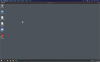
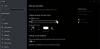
Screen Shot 2021-11-19 at 10.31.08 AM.pngScreen Shot 2021-11-19 at 10.36.18 AM.png
 
Hello @khaosspawn , please follow the steps Open the Mouse pointer window by navigating to Windows Start Menu > PC Settings > Ease of Access > Mouse pointer. You can change your pointer size by dragging the slider under Change pointer size. Choose a pointer size from 1 to 15, where 1 is the default size. please let us know is the issue still persist. Thanks, Parallels Team.
 
I was able to fix this by setting View->Retina Resolution from Scaled to Best for Retina display.
Thank you for sharing,

On my 2020 Macbook Air M1, running MacOS 12.2 Beta and Parallels 17.1.1 the only way for me to have a normal sized cursor was to set it to "scaled" under the view -> Retina Resolution menu, but very happy it was able to reset the size.
 
Thank you for sharing,

On my 2020 Macbook Air M1, running MacOS 12.2 Beta and Parallels 17.1.1 the only way for me to have a normal sized cursor was to set it to "scaled" under the view -> Retina Resolution menu, but very happy it was able to reset the size.
The only way I can resolve this is to do the opposite. From Best for Retina to Scaled. It looks awful and jagged - but at least the cursor is not huge.
 
This is still happening on a fresh install of Windows 11 on a new machine. It does not happen on other computers that have Windows 11 installed a few months ago. When set to Retina, the cursor is comically huge. It is normal when set to "scaled," but that is unusably terrible to look at.

This has to be a bug in the recent versions of Parallels.

Can we please get a fix for this?
 
I have the same bug, the cursor is comically huge when i use 5k resolution with scale 200% on windows 11
 
I have the same problem. But cursor is getting normal view when I try to drag any window to anywhere until I stop it. It didn't happen when I let Parallels to select windows version. I downloaded from website and this version occurs this problem. How can I solve this? I need to install Windows 11 Pro.
 
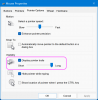
I managed to "solve" it by activating the Display pointer trails option in the Mouse Properties dialog (press Windows + R, then type main.cpl and press Enter).
 

Attachments

  • 2022-11-29.png
    2022-11-29.png
    110.1 KB · Views: 56
I managed to "solve" it by activating the Display pointer trails option in the Mouse Properties dialog (press Windows + R, then type main.cpl and press Enter).
This also works for me. It's a little annoying, but setting the trail to Short makes it better than having a stupidly large pointer.
 
This works but broken the top and right mouse function:
- Mouse to the top to show the Parallel desktop config menu
- Mouse to the right (when I have windows toolbar docked right) to show MAC apps.
This issue needs to be addressed by PD. It was not having the issue in PD 15/16.
 
I had the same issue and only turning on cursor trail worked but that was annoying. But then I restarted Windows and it fixed itself.
 
This also works for me. It's a little annoying, but setting the trail to Short makes it better than having a stupidly large pointer.
Hello,

Thank you for your feedback.
To let us better understand the situation, please perform the following steps:

1. Reproduce the issue.
2. Collect an a technical report at the moment of issue reproduction (Help > Send technical data > check "Attach screenshots..." > press Send Report) and send the report's 9-digit ID as a reply
 
This works but broken the top and right mouse function:
- Mouse to the top to show the Parallel desktop config menu
- Mouse to the right (when I have windows toolbar docked right) to show MAC apps.
This issue needs to be addressed by PD. It was not having the issue in PD 15/16.
Hello,

Thank you for your feedback.
To let us better understand the situation, please perform the following steps:

1. Reproduce the issue.
2. Collect an a technical report at the moment of issue reproduction (Help > Send technical data > check "Attach screenshots..." > press Send Report) and send the report's 9-digit ID as a reply
 
I had the same issue and only turning on cursor trail worked but that was annoying. But then I restarted Windows and it fixed itself.
Hello,

Thank you for your feedback.
To let us better understand the situation, please perform the following steps:

1. Reproduce the issue.
2. Collect an a technical report at the moment of issue reproduction (Help > Send technical data > check "Attach screenshots..." > press Send Report) and send the report's 9-digit ID as a reply
 
Hello,

Thank you for your feedback.
To let us better understand the situation, please perform the following steps:

1. Reproduce the issue.
2. Collect an a technical report at the moment of issue reproduction (Help > Send technical data > check "Attach screenshots..." > press Send Report) and send the report's 9-digit ID as a reply
I made a video
433832719
 
Back
Top