I am running Mojave on 1900-1200 dual monitors no retina and I have enabled Dark Mode and with
CGFontRenderingFontSmoothingDisabled = 0
AppleFontSmoothing = 1
Preferences > Accessibility > Display > Reduce Transparency checked and slight adjustment to Display Contrast.
These additional setting are to address blurry fonts under Dark Mode in most conditions.
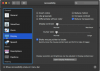
What I am seeing in Parallels Preference Pane though are fonts not being rendered correctly compared to other apps (Compared to Apple Apps). I have attached what I am seeing. I also attached a screenshot from Apple Preference Pane which shows similar elements being rendered correctly.
I think there is something not fully implemented for Dark Mode.
CGFontRenderingFontSmoothingDisabled = 0
AppleFontSmoothing = 1
Preferences > Accessibility > Display > Reduce Transparency checked and slight adjustment to Display Contrast.
These additional setting are to address blurry fonts under Dark Mode in most conditions.
What I am seeing in Parallels Preference Pane though are fonts not being rendered correctly compared to other apps (Compared to Apple Apps). I have attached what I am seeing. I also attached a screenshot from Apple Preference Pane which shows similar elements being rendered correctly.
I think there is something not fully implemented for Dark Mode.