
Hello,
we have an issue with Microsoft 365 Office authentication that occurs only in Parallels HTML5.
Environment
- Parallels Client: Office sign-in works
- RDS desktop: Office sign-in works
- Parallels HTML5: Office sign-in fails
In HTML5, Outlook immediately fails with:
Something went wrong. [4nsw]
Error Code: 2147746132
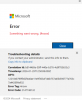
The Workspace ONE authentication window never appears in HTML5.
In Parallels Client/Desktop, the normal flow works (email → Workspace ONE auth → success).
We also noticed that this process gets triggered during Office login:
Microsoft.AAD.BrokerPlugin.exe -ServerName:App.AppXgvz9wxd0frjs1prg5kvtcz083996jyv.mca
Question
Is this a known limitation of Parallels HTML5 with certificate / broker-based authentication (Workspace ONE, WAM)?
Is there a supported workaround, or is this unsupported by design?
Thanks in advance.
we have an issue with Microsoft 365 Office authentication that occurs only in Parallels HTML5.
Environment
- Parallels RAS
- Windows Server RDS
- Microsoft 365 / Outlook (64-bit)
- Authentication via VMware Workspace ONE (certificate-based)
- Parallels Client: Office sign-in works
- RDS desktop: Office sign-in works
- Parallels HTML5: Office sign-in fails
In HTML5, Outlook immediately fails with:
Something went wrong. [4nsw]
Error Code: 2147746132
The Workspace ONE authentication window never appears in HTML5.
In Parallels Client/Desktop, the normal flow works (email → Workspace ONE auth → success).
We also noticed that this process gets triggered during Office login:
Microsoft.AAD.BrokerPlugin.exe -ServerName:App.AppXgvz9wxd0frjs1prg5kvtcz083996jyv.mca
Question
Is this a known limitation of Parallels HTML5 with certificate / broker-based authentication (Workspace ONE, WAM)?
Is there a supported workaround, or is this unsupported by design?
Thanks in advance.