Hi!
I posted a this a while ago, but since my thread was overlooked and not answered, I'm gonna try to rephrase the question and see if it makes more sense.
I've recently installed Parallels and overall I'm pretty pleased with the result.
However. The only thing I'm missing is being able to use the Ctrl, Win, Alt and AltGr key as I would on a normal Windows laptop.
That would mean the following mapping:
- Ctrl = Ctrl
- Left Option = Win
- Left Command = Alt
- Right Command = AltGr
- Right Option = Print Screen
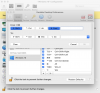
Is this possible? What stops me from being able to do this right now is that it's seems like you can't bind left and right option/command to different Windows key in the "Parallels Desktop Preferences -> Shortcuts -> Windows 10" menu. But since the default binding actually binds left Command to Alt, and right Command to AltGr, it's seems to be possible somewhere.
Please note that a "no, this is not possible" is also a valid answer if that's the case.
I posted a this a while ago, but since my thread was overlooked and not answered, I'm gonna try to rephrase the question and see if it makes more sense.
I've recently installed Parallels and overall I'm pretty pleased with the result.
However. The only thing I'm missing is being able to use the Ctrl, Win, Alt and AltGr key as I would on a normal Windows laptop.
That would mean the following mapping:
- Ctrl = Ctrl
- Left Option = Win
- Left Command = Alt
- Right Command = AltGr
- Right Option = Print Screen
Is this possible? What stops me from being able to do this right now is that it's seems like you can't bind left and right option/command to different Windows key in the "Parallels Desktop Preferences -> Shortcuts -> Windows 10" menu. But since the default binding actually binds left Command to Alt, and right Command to AltGr, it's seems to be possible somewhere.
Please note that a "no, this is not possible" is also a valid answer if that's the case.