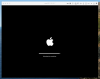
I have an iMac Late 2013 and therefore Big Sur is not supported (sadly for me and many others  ). I would like at least to test Big Sur in a Parallels VM but I am unable to install Catalina 10.15.7 so I can upgrade inside the VM. How I can install Cataling properly inside the VM?? See the attached screenshot for more info
). I would like at least to test Big Sur in a Parallels VM but I am unable to install Catalina 10.15.7 so I can upgrade inside the VM. How I can install Cataling properly inside the VM?? See the attached screenshot for more info