
Install the app
How to install the app on iOS
Follow along with the video below to see how to install our site as a web app on your home screen.
Note: This feature may not be available in some browsers.
You are using an out of date browser. It may not display this or other websites correctly.
You should upgrade or use an alternative browser.
You should upgrade or use an alternative browser.
macOS Big Sur and Parallels Desktop
- Thread starter IvanD@Parallels
- Start date
Well - this does prove some issues nonetheless. It will start - but cannot shut down. Parallels - please, stay up-to-date and act on this (spreading problem).Okay - that's a pretty "techy way"- but it works:
Thanks!Okay - that's a pretty "techy way"- but it works:
Hi, how can I change the environment variableThanks Craig, this works for me. I set the environment variable SYSTEM_VERSION_COMPAT=1 and use command 'open -a "Parallels Desktop" ', now PD15 can start and I can run my Windows VM.
Thanks!Okay - that's a pretty "techy way"- but it works:
Hello everyone! This thread is dedicated to your feedbacks and questions about macOS Big Sur and Parallels Desktop, feel free to share them. Since the beta version of macOS Big Sur has just been released, the compatibility of Parallels Desktop and macOS Big Sur hasn't been fully tested yet by the Parallels Engineering Team. On the other hand, your feedbacks will help us to test and cover as many scenarios as possible. If your feedback includes technical data along with a short description of the situation you encountered, it will make further troubleshooting and resolution more efficient.
For your convenience we created KB article about the known issues with macOS 11 Big Sur and Parallels Desktop for Mac. Check the KB for more information and subscribe to get timely updates on the available workarounds and fixes.
Hi,
I have installed the last beta of MacOS Big Sur,
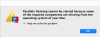
And now parallels doesn't work (version: ParallelsDesktop-15.1.4-47270), I have this message:
"
Parallels Desktop cannot be started because some of the required components are missing from the operating system of your Mac.
"
How can I solve this problem?
Thank you.
Best regards,
Mario
Attachments
Hi Peter, how you change the environment variable for this to work?yes, that works But unfortunately i cannot modify any VM setting via the control center. Beachball and nothing more.
Wondering if someone here has a fully working PD15 on BS beta 3 .
Julio.Bouza
Bit poster
Somehow I had luck getting BS Beta 3 running on PD 15 doing a clean install; the previous Beta was working and then it started to restart out of nowhere. So I did a clean install on a new VM with only BS Beta 3; it threw the black screen with all the exceptions and I let it sit there and then it restarted and the install started. The challenges with the keyboard with Y, I, etc are not there now. The challenge with the constant restart which on my end would happen if I logged in to iCloud are not there now either; I was able to login to iCloud with no challenges and no restart. Installing Parallels Tool; still doesn't work though. I created a new snapshot and installed it and when it restarts it just sit there but never completes; so I reverted to the previous snapshot. So far so good at least for me.
Open the terminal,Hi, how can I change the environment variable
Type:
export SYSTEM_VERSION_COMPAT=1
open -a "Parallels Desktop"
Parallels will then start
same problem hereyes, that works But unfortunately i cannot modify any VM setting via the control center. Beachball and nothing more.
Wondering if someone here has a fully working PD15 on BS beta 3 .
P
Parallels User
Workaround works for me! ThanksOpen the terminal,
Type:
export SYSTEM_VERSION_COMPAT=1
open -a "Parallels Desktop"
Parallels will then start
This worked great. Thank you!export SYSTEM_VERSION_COMPAT=1