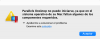
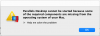
This worked for me! (I borrowed your logic board identifiers, I hope you don't mind, lmao.) I think this must be some cryptic DSMOS (Don't Steal Mac OS) type thing.I found this here and fixed my issue.
https://developer.apple.com/forums/thread/649774
I was able to get past the "BIErrorDomain error 3" issue in Parallels as follows:
Code Block
On a real, supported Mac, run this command in Terminal:
ioreg -l | grep board-id
2. Make a note of the board ID (mine is Mac-551B86E5744E2388, for example)
3. Run this command in Terminal:
Code Block
sysctl hw.model
4. Make a note of the hardware model (mine is MacBookPro14,3)
5. In the VM configuration, under Hardware -> Boot Order -> Advanced Settings -> Boot flags, enter the following (inserting the information noted above where shown):
Code Block
devices.mac_hw_model="<model>"
devices.smbios.board_id="<board ID>"
That should be enough to allow the installer to proceed.
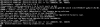
Now my issue is that I can't get to the desktop for more than about a second before it chokes up and sends me back to the login window. I took a screen recording of the output when it was sending me back to the login window. (I booted into Safe Mode and Verbose.)