
Install the app
How to install the app on iOS
Follow along with the video below to see how to install our site as a web app on your home screen.
Note: This feature may not be available in some browsers.
You are using an out of date browser. It may not display this or other websites correctly.
You should upgrade or use an alternative browser.
You should upgrade or use an alternative browser.
macOS Big Sur and Parallels Desktop
- Thread starter IvanD@Parallels
- Start date
Hello. I managed to install Big Sur by updating Catalina after creating the disk partition of at least 80GB (no 64GB the standard size to avoid the subsequent 'lack of space' error) and after inserting the 2 lines in Hardware -> Boot Order -> Advanced Settings -> Boot flags
The installation procedure has gone on and seems to have ended without problems, but at the moment of completion, therefore first start, a BLACK screen is displayed ... is this a problem of the Parallel version that does not yet fully support Big Sure?
The installation procedure has gone on and seems to have ended without problems, but at the moment of completion, therefore first start, a BLACK screen is displayed ... is this a problem of the Parallel version that does not yet fully support Big Sure?
I've found that installing Parallels Tools results in the Big Sur VM hanging at boot, so you might want to avoid doing that (or at least create a snapshot before trying it).
I've experienced the same thing. Even "Safe Mode" boot of the VM can't get it to start.
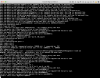
Technical report ID: 343273664
backslash-f
Bit poster
Big Sur runs fine (fresh VM, fresh Big Sur installation via DMG) until I install Parallels Tools via Actions / Reinstall Parallels Tools. After the reinstallation of Parallels Tools and after all permissions are granted via System Preferences / Privacy the VM gets stuck in a black screen after the reboot.
Report ID: 343276075
Report ID: 343276075
I used
Code:sudo hdiutil create -o InstallMedia -size 20G -layout SPUD -fs HFS+J -type SPARSE sudo hdiutil attach InstallMedia.sparseimage -noverify -mountpoint /Volumes/install_build sudo /Applications/Install\ macOS\ Beta.app/Contents/Resources/createinstallmedia --volume /Volumes/install_build sudo hdiutil detach /Volumes/Install\ macOS\ */ sudo hdiutil convert InstallMedia.sparseimage -format UDZO -o InstallMedia.dmg sudo rm InstallMedia.sparseimage
This worked, thanks! Perhaps I needed sudo for some of my commands, or maybe 10G wasn't quite big enough.
I'm also stuck at the login screen. I can get in, and the Feedback assistant shows up on screen, then it goes black and logs me back out. Bummer, but at least I have it on an external drive and can mess with it that way.
I'm seeing this as well - I think it is actually a crash in the WindowServer process. I can get it to happen every time when I click on the menubar (which is empty for me...i.e. no clock or any other icons).
I had this problem with Parallels tools. I uninstalled them, and can reach the Big sur login screen. Now I'm stuck there.Hello. I managed to install Big Sur by updating Catalina after creating the disk partition of at least 80GB (no 64GB the standard size to avoid the subsequent 'lack of space' error) and after inserting the 2 lines in Hardware -> Boot Order -> Advanced Settings -> Boot flags
The installation procedure has gone on and seems to have ended without problems, but at the moment of completion, therefore first start, a BLACK screen is displayed ... is this a problem of the Parallel version that does not yet fully support Big Sure?
Me too. Any ideas on how to diagnose the WindowServer crashes?I'm seeing this as well - I think it is actually a crash in the WindowServer process. I can get it to happen every time when I click on the menubar (which is empty for me...i.e. no clock or any other icons).
I'm seeing this as well - I think it is actually a crash in the WindowServer process. I can get it to happen every time when I click on the menubar (which is empty for me...i.e. no clock or any other icons).
Happening to me as well - not really sure what to try as a workaround!
Hello. I managed to install Big Sur by updating Catalina after creating the disk partition of at least 80GB (no 64GB the standard size to avoid the subsequent 'lack of space' error) and after inserting the 2 lines in Hardware -> Boot Order -> Advanced Settings -> Boot flags
The installation procedure has gone on and seems to have ended without problems, but at the moment of completion, therefore first start, a BLACK screen is displayed ... is this a problem of the Parallel version that does not yet fully support Big Sure?
I see exactly the same problem.
This doesn't solve the problem for me. I am upgrading from 10.15.5 as a Parallels virtual.I was able to get past the "BIErrorDomain error 3" issue in Parallels as follows:
That should be enough to allow the installation to proceed.
- On a real, supported Mac, run this command in Terminal:
ioreg -l | grep board-id- Make a note of the board ID (mine is Mac-551B86E5744E2388, for example)
- Run this command in Terminal:
sysctl hw.model- Make a note of the hardware model (mine is MacBookPro14,3)
- In the VM configuration, under Hardware -> Boot Order -> Advanced Settings -> Boot flags, enter the following (inserting the information noted above where shown):
devices.mac_hw_model="<model>"
devices.smbios.board_id="<board ID>"
Me too. Any ideas on how to diagnose the WindowServer crashes?
Log it as a feedback with Apple. The more it gets reported, the more likely it will be to be looked at. I gathered the crash logs, gave screenshots and examples of what was going on, and mentioned it was installed within Parallels. I also offered access to a copy of my VM in case that would help them as well to find out what is happening.Happening to me as well - not really sure what to try as a workaround!
how did you uninstall them? if you don't log in I don't see the disk to uninstall the tools ...I had this problem with Parallels tools. I uninstalled them, and can reach the Big sur login screen. Now I'm stuck there.
Carbonideus
Junior Member
Here is a new one:
- I resized my 10.15.5 partition to 130 GB
- I created a new partition into which I restored the installer image created as per the instructions above
- I added the 2 configuration strigns appropriate for my iMac model to the boot options
Now, I can start the VM perfectly fine from the second installer partition and (and now Parallels is running Big Sur) but when I try to install on the primary partition, I get the exact same error n° 3 ! I erased the 10.15 partition, but error 3 subsists.
Again, I can switch at leisure between 10.15 and 11, but Big Sur just won't install.
I'm still on Parallels 15.1.2, could this be the explanation?
- I resized my 10.15.5 partition to 130 GB
- I created a new partition into which I restored the installer image created as per the instructions above
- I added the 2 configuration strigns appropriate for my iMac model to the boot options
Now, I can start the VM perfectly fine from the second installer partition and (and now Parallels is running Big Sur) but when I try to install on the primary partition, I get the exact same error n° 3 ! I erased the 10.15 partition, but error 3 subsists.
Again, I can switch at leisure between 10.15 and 11, but Big Sur just won't install.
I'm still on Parallels 15.1.2, could this be the explanation?
Carbonideus
Junior Member
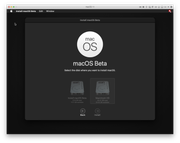
Here's a screenshot:
Moving forward with ARM processors, it is my personal preference that Parallels support both ARM-based guests as well as x86 / x86-64 guests. Our office relies on this for some important accounting packages. As these apps are Windows only, I doubt they care what Apple does and thus also wouldn't care to support ARM.
I was able to install Big Sur without any issues after making some changes as advised on this forum. I did not install the Parallels Tools as it was leading to a blank screen during my previous install attempt. However I have a new issue. It would not let me login. I enter the password. The screen turns black for a couple of seconds and brings me back to the login. I am stuck here. I noticed that other people seem to be experiencing a similar issue. Any suggestions from the Parallels Technical team would help.
I've got parallels running steady, only missing '2'. The other numbers and keys seem to work. I left my parallels machines on te Catalina partition and re-installed Parallels. Performance wise, it seems to work OK, but using the on screen keyboard is an unusable solution for productivity.
The presentation Apple gave mentioned 2 relevant things: Rosetta 2 and virtualisation. Rosetta 2 doesn't support some x86_64 bit instructions, like those used in hypervisors (source Apple). Virtualisation was mentioned but nothing more. They ran a version of Debian in the video but they actually did not use it. It gave me the "look but don't touch or it will break" vibe. If Apple could have given a demo on Windows 10, they would have: after all: they also showed the Office for ARM branch that Microsoft had for years. I think the Just In Time compiler isn't ready for full scale Windows 10 support.
The future.. well Apple migrated too Intel from PowerPC by simply stopping support. So apple users will see a gradual incline in ARM based tools and decline in x86_64 tools. Those users that still need Windows 10 because that's their target platform: Linux, KVM and done.
The presentation Apple gave mentioned 2 relevant things: Rosetta 2 and virtualisation. Rosetta 2 doesn't support some x86_64 bit instructions, like those used in hypervisors (source Apple). Virtualisation was mentioned but nothing more. They ran a version of Debian in the video but they actually did not use it. It gave me the "look but don't touch or it will break" vibe. If Apple could have given a demo on Windows 10, they would have: after all: they also showed the Office for ARM branch that Microsoft had for years. I think the Just In Time compiler isn't ready for full scale Windows 10 support.
The future.. well Apple migrated too Intel from PowerPC by simply stopping support. So apple users will see a gradual incline in ARM based tools and decline in x86_64 tools. Those users that still need Windows 10 because that's their target platform: Linux, KVM and done.