
Install the app
How to install the app on iOS
Follow along with the video below to see how to install our site as a web app on your home screen.
Note: This feature may not be available in some browsers.
You are using an out of date browser. It may not display this or other websites correctly.
You should upgrade or use an alternative browser.
You should upgrade or use an alternative browser.
macOS Big Sur and Parallels Desktop
- Thread starter IvanD@Parallels
- Start date
Really?None of Parallels versions are compatible with Big Sur
Based on https://kb.parallels.com/125039 the latest version mostly works with Big Sur Beta 5 as host OS
It did not, it crashed the MAC whenever you started the VM using Parallels Hypervisor, it would "work" with Apple Hypervisor but there would be VM pauses for long periods of time (i.e. vm would pause for an hour). However, PD16 released another update yesterday, and Parallels Hypervisor now does not restart MacOSReally?
Based on https://kb.parallels.com/125039 the latest version mostly works with Big Sur Beta 5 as host OS
It did not, it crashed the MAC whenever you started the VM using Parallels Hypervisor, it would "work" with Apple Hypervisor but there would be VM pauses for long periods of time (i.e. vm would pause for an hour). However, PD16 released another update yesterday, and Parallels Hypervisor now does not restart MacOS
Sounds like I need to buy the UG


Maria@Parallels
Problem solver
Hello guys, if he issue still persists after update to the latest Parallels Desktop build 16.0.1 please collect the tech report and post the report's ID here.
Maria@Parallels
Problem solver
Glad to know! Thanks a lot for sharing your experience with us!I'm using 16.0.1 with beta 6 and Parallel hypervisor is working fine with a Windows 10 VM. After upgrade VM tools inside VM the client is ok and performances are good.
Glad to know! Thanks a lot for sharing your experience with us!
The Windows VM still freezes on restarting after installing a new Insider version.
Running Big Sur Public Beta 3 and Parallels Pro 16.01. I now get a Preferences Error every time I attempt to go into Settings->Security and Privacy.
Unfortunately, Parallels came out with their update the same day the I updated to Big Sur Public Beta 3. It's definitely parallels that's causing the issue. If I uninstall parallels, the problem goes away. If I force turn off the Gatekeeper, quit parallels, then turn Gatekeeper back on the problem stops. As soon as I run Parallels, it causes the issue again.
Don't know if it's a Big Sur Public Beta 3 thing or a Parallels 16.01 thing. Driving me NUTS!
Unfortunately, Parallels came out with their update the same day the I updated to Big Sur Public Beta 3. It's definitely parallels that's causing the issue. If I uninstall parallels, the problem goes away. If I force turn off the Gatekeeper, quit parallels, then turn Gatekeeper back on the problem stops. As soon as I run Parallels, it causes the issue again.
Don't know if it's a Big Sur Public Beta 3 thing or a Parallels 16.01 thing. Driving me NUTS!
JARVIS1187
Bit poster
You really should update your beta version of Big Sur.
The problem you describe is a Big Sur error, as far as I know. Had that problem multiple times. You can close the system settings window from macOS, open it again via the apple-menu in the top bar and open the settings again. Then open the security settings. If it shows the same error, open it again like this. After mostly 3 times, it worked for me.
The problem you describe is a Big Sur error, as far as I know. Had that problem multiple times. You can close the system settings window from macOS, open it again via the apple-menu in the top bar and open the settings again. Then open the security settings. If it shows the same error, open it again like this. After mostly 3 times, it worked for me.
SimpleMath
Bit poster
Running Big Sur Public Beta 6 (Build 20A5364e) with Windows 10 as my Virtual Machine and I have this strange grey bar in the top right hand corner of my VM screen. I have attached a screenshot for a visual. Anyone else experiencing this or know what is going on here? or possibly a fix? Thank you!
Attachments
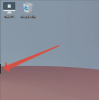
That appears in other situations as well. Its not related to Parallels. Whenever I start an app in full screen mode that bar appears.Running Big Sur Public Beta 6 (Build 20A5364e) with Windows 10 as my Virtual Machine and I have this strange grey bar in the top right hand corner of my VM screen. I have attached a screenshot for a visual. Anyone else experiencing this or know what is going on here? or possibly a fix? Thank you!
SimpleMath
Bit poster
Thanks for your feedback. After some additional research, I did discover this is a random bug with the Big Sur PB6. At the time I had not seen it on any other application so I posted here.That appears in other situations as well. Its not related to Parallels. Whenever I start an app in full screen mode that bar appears.
Is anyone having an issue with this?
I have MS Outlook running on W10 VM (because Outlook sucks and destroys my battery in OSX) and files get opened in OSX for Word, Excel, etc when I open a file from an email. Now, when I open an attachment, it opens the application (Word, Excel, etc) but the file itself won't open. It's like i just opened the application but that's it.
Same goes for PDF. I have Adobe Acrobat DC installed as an OSX app but won't open any files that are coming from the VM.
I have full disk access to Parallels, etc. It was working fine before the updgrade to this beta. Running latest versions on both.
I have MS Outlook running on W10 VM (because Outlook sucks and destroys my battery in OSX) and files get opened in OSX for Word, Excel, etc when I open a file from an email. Now, when I open an attachment, it opens the application (Word, Excel, etc) but the file itself won't open. It's like i just opened the application but that's it.
Same goes for PDF. I have Adobe Acrobat DC installed as an OSX app but won't open any files that are coming from the VM.
I have full disk access to Parallels, etc. It was working fine before the updgrade to this beta. Running latest versions on both.
SimpleMath
Bit poster
Is anyone having an issue with this?
I have MS Outlook running on W10 VM (because Outlook sucks and destroys my battery in OSX) and files get opened in OSX for Word, Excel, etc when I open a file from an email. Now, when I open an attachment, it opens the application (Word, Excel, etc) but the file itself won't open. It's like i just opened the application but that's it.
Same goes for PDF. I have Adobe Acrobat DC installed as an OSX app but won't open any files that are coming from the VM.
I have full disk access to Parallels, etc. It was working fine before the updgrade to this beta. Running latest versions on both.
I am experiencing this issue as well. However, it's not with the same applications as you're using. I have Acorn (photo editor) installed on my Mac (Big Sur PB6) and when running my Windows 10 VM -- if I right click on a photo and choose "open with" then " Acorn (Mac)" it will open Acorn but not the file. It's like you said, it opens the application but not the file so it's almost as if you just opened the app by itself. Not sure if it's a Big Sur beta issue or a Parallels issue.
karlemilnikka
Member
I'm also having this issue (and the video RAM is limited to 3 MB even though I've set it to 512 MB). Report ID 350282575.With 16.0.1, the resolution in Big Sur as guest OS is still locked at 768 x 1024.
juls
Maria@Parallels
Problem solver
Hello, could you please provide us with a tech report once the issue reproduced?Running Big Sur Public Beta 6 (Build 20A5364e) with Windows 10 as my Virtual Machine and I have this strange grey bar in the top right hand corner of my VM screen. I have attached a screenshot for a visual. Anyone else experiencing this or know what is going on here? or possibly a fix? Thank you!