
Issue: The Alarm app in macOS Golden Gate 27.0 is not functioning properly. Users cannot edit alarm times — the hour and minute fields are unresponsive and cannot be changed.
Steps to Reproduce:
Expected Behavior:
Users should be able to:
Actual Behavior:
Environment:
Impact: Users cannot set or modify alarms due to this bug, rendering the feature entirely non-functional.
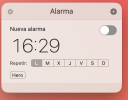
Steps to Reproduce:
- Open the Alarm app in macOS Golden Gate 27.0
- Create a new alarm
- Attempt to modify the hour or minute values
- Observe that the fields do not respond to input
Expected Behavior:
Users should be able to:
- Click on the hour field and adjust the time
- Click on the minute field and adjust the time
- Confirm changes and save the alarm with the new time
Actual Behavior:
- The time fields (hours and minutes) are locked and do not accept input or changes
- The alarm creation dialog remains interactive in other areas (e.g., repeat days, sound selection) but time editing is blocked
Environment:
- macOS Golden Gate 27.0
- Alarm app (native)
Impact: Users cannot set or modify alarms due to this bug, rendering the feature entirely non-functional.