M1 with Windows 10 Client ARM64 Insider Preview (Build 21286)

GanapathiB

Bit poster
Help ! Is it possible to install a second VM (ARM-based) in Windows 10 ARM Insider?
My machine is a MacBook Air with M1, installed is Parallels 16.5 with Windows 10 ARM Insider.

My problem, I have a program that only runs under XP or
Windows 7. Not anymore under Windows 10, not even in compatibility mode XP or Windows 7.

My last machine was MacBook Air (Intel), with Parallel 15 and Windows 7. Here everything ran without problems.

The idea is to install a second VM under Window 10 ARM. Windows 7 is to be installed there.

Will this work or not?

I would be very grateful for helpful information. I need it professionally.

Thanks and greetings Ganapathi
 
Theoretically it is possible if you will find any VM software, which will run under windows 10 ARM x86 emulation. I think you need to look for rather old versions, which do not use any hardware assisted virtualization.
 
Theoretically it is possible if you will find any VM software, which will run under windows 10 ARM x86 emulation. I think you need to look for rather old versions, which do not use any hardware assisted virtualization.
Danke für den Tipp. Hat jemand eine Idee, welche VM mit welcher Version das sein könnte.
Thanks for the tip. Does anyone have an idea which VM with which version this could be.
 
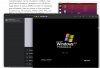
Update: UTM is now native M1 application. It uses QEMU and works through pure software emulation.

Here is XP running on M1 under UTM:
xp.jpg
 
Hello Alexey,
thank you for the really helpful information.
Please let me summarise so that I understand it correctly.

On my M1 I have Parallels 16.5 with Windows 10 ARM insider.
It is now possible to install a second VM UTM on the MAC side and install XP or Windows 7 there.

This could solve my problem described above.
It is important that both Windows 10 ARM and XP are available on the M1.

Is the installation difficult, I am not so the best at it.
Which app should use from „download" or "mac app store"?

Greetings Ganapathi
 
On my M1 I have Parallels 16.5 with Windows 10 ARM insider.
It is now possible to install a second VM UTM on the MAC side and install XP or Windows 7 there.
Yes.

Which app should use from „download" or "mac app store"?
Direct download is free, version in App Store is donated, so it cost $10. Both are the same, but version from store will be automatically updated.
Installation is usual for Mac.

I am guessing UTM and PD can coexist and can run at the same time?
Yes.

I need to point out again, that running old OS via UTM is possible only through full software emulation, so it will be rather slow. UTM also has no any video acceleration. It suitable only for running old specific software which cannot run directly in Windows 10 ARM. And of course, it is not as stable as PD is.
 
Back
Top